Health Insurance Cards OCR API

Extract detailed data from Health Insurance Cards in seconds using Veryfi's multi-modal LLM API called AnyDocs. A health insurance card contains vital information about an individual's medical coverage, including member ID, group number, plan details, and provider networks. By extracting data from health insurance cards, you can streamline patient registration, automate benefits verification, accelerate claims processing, and ensure accurate billing and compliance with healthcare regulations.

Get Started for Free Free Demo
Health Insurance Cards OCR API

POST /api/v8/partner/any-documents · Live

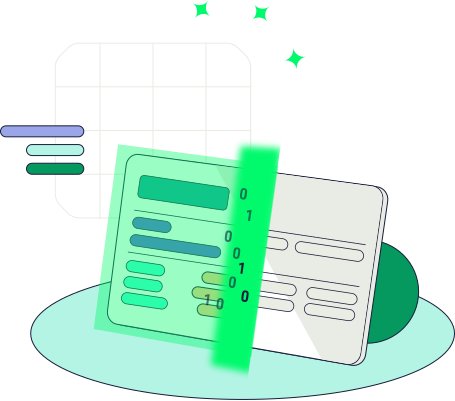
Insurance card in. JSON out.

Veryfi’s Health Insurance Cards OCR API reads a US health insurance card and returns the payer, member ID, group, plan, Rx BIN, PCN, and copay as JSON via POST /api/v8/partner/any-documents with blueprint us_health_insurance_card. Patient intake, pharmacies, and claims workflows use that payload instead of keying the card by hand. See supported card fields and the Process an AnyDoc docs.

0 fields snapping into JSON

What is a health insurance card?

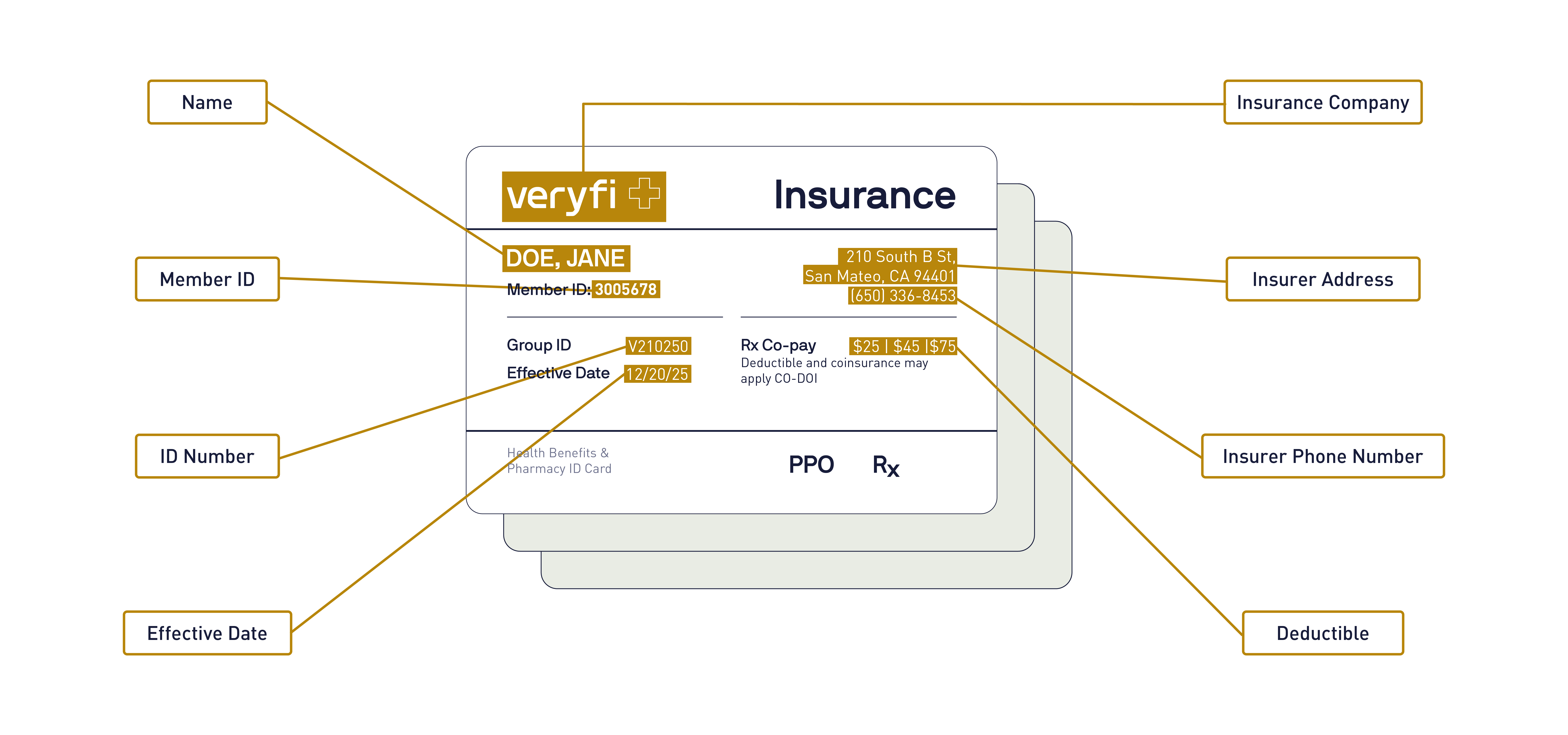
A health insurance card is the card a member shows to prove medical coverage. It names the insurance company, the subscriber, the member ID, the group number, and the plan. The pharmacy block often adds an Rx BIN, an RxPCN, and an RxGRP.

Front desks, pharmacies, and billing teams need those same values as data. The API above returns that card as JSON.

Did you know

The member ID names the person. The group number names the plan. Everyone at one employer can share a group, and the pharmacy group on the back can differ from the medical group on the front.

Unlock a Wealth of Data in Health Insurance Cards

Every health insurance card contains dozens of critical data points that healthcare organizations desperately need—member IDs, group numbers, plan types, coverage tiers, copay amounts, deductible information, and provider network details—yet most medical practices, hospitals, and healthcare systems still rely on painfully manual processes that consume 15-25 minutes per patient registration, create massive administrative bottlenecks, and leave dangerous room for human error. From urgent care centers losing precious time while patients wait for benefits verification, to specialty clinics struggling with prior authorization delays, to telehealth platforms battling insurance validation roadblocks, the cost of manual insurance verification extends far beyond wasted time—it directly impacts patient care, revenue cycle efficiency, and regulatory compliance.

Veryfi’s Health Insurance Card OCR API transforms this broken process by instantly extracting structured, actionable data from physical cards and digital images with 99%+ accuracy, eliminating the need for manual data entry, lengthy verification calls, and the endless administrative friction that delays patient care and frustrates both staff and patients. Whether you’re processing dozens of patients daily or thousands, our advanced machine learning technology scales effortlessly to turn health insurance cards into instant patient intelligence, helping forward-thinking healthcare organizations across every specialty—from dental practices ensuring seamless appointments to hospital systems accelerating emergency admissions—stop losing time and revenue to verification delays and start gaining the operational advantage that comes from real-time, automated insurance processing.

Let’s Veryfi It

Member ID, group, and plan from an Aetna card. Drag across to reveal the altered card. Test drive Veryfi — 14-day free trial, or speak to a Veryfi Expert.

CHOICE POS II
L1NDA SMITH edit
ID W1234 99999 edit
GRP 123456-010-78910
Issuer (80840) 9140860054
PCP$25.00
SPC$40.00
ER$150.00
Member services1-800-231-7729
Providers1-800-475-4751
www.aetna.comPayer 60054
CHOICE POS II
LINDA SMITHedit
ID W1234 56789edit
GRP 123456-010-78910
Issuer (80840) 9140860054
PCP$25.00
SPC$40.00
ER$150.00
Member services1-800-231-7729
Providers1-800-475-4751
www.aetna.comPayer 60054
Request: Health Insurance Cards Data Extraction
import requests
url = "https://api.veryfi.com/api/v8/partner/any-documents"
headers = {
'CLIENT-ID': '<API_KEY_VALUE>',
'AUTHORIZATION': '<API_KEY_VALUE>'
}
payload = {'file_url': 'https://cdn…'}
response = requests.post(url, headers=headers, data=payload)
print(response.json())
Response: Structured JSON
{
“external_id”: null,
“img_url”: “/api-demo/static/demos/us-health-insurance-card/img.png”,
“img_thumbnail_url”: “/api-demo/static/demos/us-health-insurance-card/img.png”,
“id”: 5990193,
“created_date”: “2025-05-01 17:36:13”,
“updated_date”: “2025-05-01 17:36:13”,
“bin_number”: “83717”,
“dependent_names”: [],
“effective_date”: null,
“group_number”: null,
“insurance_company”: “Kaiser Permanente Insurance Company”,
“member_id”: “19287382”,
“pcn_number”: “NCSF”,
“policy_number”: “19287382”,
“policy_plan_name”: “Exclusive Provider Organization (EPO)”,
“primary_care_provider_copay_amount”: null,
“primary_care_provider_name”: null,
“subscriber_name”: “JOHN X. DOE”
}

Developer Friendly API

Veryfi’s Health Insurance Card OCR API takes just a few lines of code to implement, as shown here. Capture member ID, group number, payer, plan type, copays, Rx BIN/PCN, and more from the front and back of any card in seconds.

Every Health Insurance Card OCR API plan includes:
✓ A pre-trained Health Insurance Card AI model that’s ready on day one
✓ Free 🧰 SDKs in your preferred programming language, so you can launch faster
✓ Veryfi Lens 📷, a document capture SDK that gives your app AI eyes to snap clean, crisp card images
✓ A no-code API Portal for storing and editing documents, fine-tuning the ML model, and more
✓ 🔒 HIPAA-compliant, SOC 2 Type 2 certified security to keep patient data protected

Built for patient intake, telehealth onboarding, pharmacies, and claims processing. Start free today.

Supported Fields

US health insurance cards extracted as JSON from POST /api/v8/partner/any-documents with blueprint us_health_insurance_card, including member ID, pharmacy BIN and PCN, and dependent names.

  • Insurance Information
    • Insurance Company
      insurance_company
      The insurance company is the carrier or plan administrator named on the card. Medical claims and eligibility questions go to this organization.What it is
      • The brand on the card, such as Kaiser Permanente, Aetna, or Blue Cross Blue Shield
      • The payer that administers the medical benefit
      • Often a different company from the pharmacy benefit manager in the prescription section
      Where to find it
      • Usually the logo or legal name at the top of the front
      • Sometimes a full legal name under the logo, such as Kaiser Permanente Insurance Company
      Stays separate from
      • Member ID and group number, which identify the person and the plan
      • Rx BIN and RxPCN, which route pharmacy claims
      Kaiser Permanente Insurance Company
    • Member ID
      member_id
      The member ID uniquely identifies the covered person under the policy. Providers and pharmacies use it to look up eligibility and submit a claim.What it is
      • The ID for the person, sometimes labeled Subscriber ID or ID Number
      • Unique to that person on this policy, even when several dependents share a card
      • Separate from the group number, which identifies the plan, and from Rx BIN, which routes pharmacy claims
      Where to find it
      • On the front, often labeled Member ID, ID #, or Subscriber ID
      • Sometimes repeated in the pharmacy block on the back
      Often used with
      • Group number, to match the right employer or individual plan
      • Subscriber name, to confirm the person presenting the card
      19287382
    • Policy Number
      policy_number
      The policy number identifies the insurance contract. Some cards print it in addition to a member ID. Some carriers use one number for both.What it is
      • The contract identifier for the coverage
      • Can match the member ID, or be a different number, depending on the carrier
      • Not a pharmacy routing code
      Where to find it
      • On the front, labeled Policy #, Policy Number, or sometimes ID
      • Uncommon inside the pharmacy-only block
      Stays separate from
      • Rx BIN, RxPCN, and RxGRP
      • The Veryfi document ID, which is assigned when the card is processed and is not printed on the card
      19287382
    • Policy Plan Name
      policy_plan_name
      The plan name is the product the member is enrolled in. It tells a provider which network and cost-sharing rules apply.What it is
      • A network type such as PPO, HMO, EPO, or POS, or a branded plan name
      • HMO plans usually require a primary care provider. PPO plans usually do not
      • The benefit design, not the insurance company itself
      Where to find it
      • Near the carrier logo, or under a label such as Plan, Product, or Coverage
      • Example: Exclusive Provider Organization (EPO)
      Read it with
      • Copay, which changes by plan
      • Primary care provider, which HMO and some EPO cards print
      Exclusive Provider Organization (EPO)
    • BIN Number
      bin_number
      An Rx BIN number is a 6-digit code on your insurance card that routes your prescription drug claim to the correct insurance company or pharmacy benefit manager.What is an Rx BIN number?
      • Stands for Bank Identification Number, also called an IIN
      • Directs electronic pharmacy claims to the correct payer
      • Identifies the specific processor or health plan network
      • Remains separate from the general medical ID or policy number
      Where to find it
      • On the front or back of the insurance card
      • Inside the prescription or pharmacy section
      • Usually labeled Rx BIN or RxBIN
      Common companion numbers
      • RxPCN: identifies the specific pharmacy network processor
      • RxGRP: specifies the employer or individual drug plan group
      • Member ID: uniquely identifies the person under the policy
      83717
    • PCN Number
      pcn_number
      An RxPCN is the Processor Control Number. Together with the BIN, it tells the pharmacy which processor and network should handle the prescription claim.What it is
      • An alphanumeric code, not always digits. A value like NCSF is typical
      • The second routing key after the BIN
      • Identifies a specific plan, network, or processor bucket inside that BIN
      Where to find it
      • In the pharmacy section, beside Rx BIN
      • Labeled RxPCN, PCN, or Processor Control Number
      • On the front or the back, depending on the carrier
      Common companion numbers
      • Rx BIN: the 6-digit payer route. A PCN does not route a claim on its own
      • RxGRP: the group inside that processor
      • Member ID: who the prescription is for
      NCSF
    • Group Number
      group_number
      The group number identifies the employer, association, or individual plan the member belongs to. On the pharmacy block it is often labeled RxGRP.What it is
      • The plan group, not a personal identifier
      • Many people at the same employer share one group number
      • The medical group and the pharmacy group (RxGRP) can differ on the same card
      Where to find it
      • Labeled Group, Group #, GRP, or RxGRP
      • The medical group is often on the front. RxGRP sits in the pharmacy block
      Read it with
      • Member ID, to find the person inside the group
      • Rx BIN and RxPCN, when the number is the pharmacy group
      784521
    • Effective Date
      effective_date
      The effective date is the day this coverage starts for the member. Care before that date is not covered under this card.What it is
      • The start of coverage, not the day the card was printed and not the end of the plan year
      • Returned as a date, for example 2024-01-01
      • A future date means the card is not active yet
      Where to find it
      • Labeled Effective, Eff. Date, or Coverage Effective
      • Often near the member name or the plan name
      • Some cards also print an end date. This field is only the start
      2024-01-01
  • Subscriber Information
    • Subscriber Name
      subscriber_name
      The subscriber is the primary policyholder, the person who holds the contract. Other people named on the card are dependents.What it is
      • The name eligibility systems expect on a claim for this policy
      • Not always the patient being seen. A child’s visit still bills under the subscriber’s policy
      • Printed as a full name, for example RICK C. SANCHEZ
      Where to find it
      • On the front, labeled Subscriber, Member, or Name
      • Above any list of dependents
      RICK C. SANCHEZ
    • Dependent Names
      dependent_names
      Dependents are the other people covered under the subscriber’s policy, such as a spouse or children. This field comes back as a list.What it is
      • Each covered person other than the subscriber
      • Example: MORTY A. SMITH and SUMMER B. SMITH
      • An empty list means the card named only the subscriber
      Where to find it
      • A Dependents section on the front or the back
      • Family cards list them. Individual cards often leave this blank
      [MORTY A. SMITH, SUMMER B. SMITH]
    • Primary Care Provider Name
      primary_care_provider_name
      The primary care provider, or PCP, is the physician or clinic the plan assigns for routine care. HMO cards print this so visits stay in network.What it is
      • The doctor the member is expected to see first
      • Common on HMO and some EPO cards. Many PPO cards leave it blank
      • Example: Dr. Jerry Smith
      Where to find it
      • Labeled PCP, Primary Physician, or Primary Care
      • Often on the front, sometimes with a phone number this field does not capture
      Dr. Jerry Smith
    • Primary Care Provider Copay Amount
      primary_care_provider_copay_amount
      This is the fixed amount the member pays for a visit with their primary care provider. It is not the deductible, and it is not a percentage coinsurance.What it is
      • A dollar amount, for example $25.00
      • Applies to a PCP office visit under this plan
      • Specialist, urgent care, and emergency copays are often different and are not this field
      Where to find it
      • Next to the PCP name, or in a copay grid labeled PCP or Office Visit
      • Printed as a dollar amount, sometimes PCP $25
      $25.00
  • Document Metadata
    • Document ID
      id
      The document ID is Veryfi’s identifier for this processed card. It is assigned at upload. It is not printed on the insurance card.What it is
      • A numeric id, for example 5990193
      • The key you use to fetch or refer to this extraction later
      • Stays with this document even if you read the same image again as a new upload
      How to use it
      • Store it beside the patient or claim in your system
      • Pass it when you need this JSON again
      5990193
    • Created Date
      created_date
      Created date is when Veryfi first stored this document. It is a processing timestamp, not the coverage effective date printed on the card.What it is
      • Set once, when the card is processed
      • Example: 2025-05-01 17:36:13
      • Independent of any date printed on the plastic
      2025-05-01 17:36:13
    • Updated Date
      updated_date
      Updated date is the last time this document record changed, such as a reprocess or an edit. A brand-new card has the same created and updated time.What it is
      • Moves forward when the record changes
      • Stays equal to created date until something updates the document
      • Not a coverage date from the card
      2025-05-01 17:36:13
    • External ID
      external_id
      External ID is your own identifier, echoed back from the request. Use it to match this JSON to a patient, encounter, or record in your system.What it is
      • Optional. You send it. Veryfi does not read it off the card
      • Example: EXT-2094837
      • Blank when the request did not include one
      EXT-2094837
  • Document Information
    • OCR Score
      meta.ocr_score
      OCR score is how confident text recognition was for this image, from 0 to 1. A score of 0.975 is about 97.5%.What it is
      • A quality signal for the whole page, not a guarantee on every field
      • Lower scores usually mean blur, glare, a tight crop, or a low-contrast photo
      • Returned under meta. It is not printed on the card
      How to use it
      • Review extractions under your own threshold before they post to a claim
      • Pair it with fraud signals when the photo looks clean but a number looks wrong
      0.975 (97.5%)
    • Page Width
      meta.pages[].width
      Page width is the processed image width in pixels. Together with page height, it is the coordinate space for anything you draw back on the scan.What it is
      • Pixel width of the image Veryfi processed, for example 1024
      • Not the physical width of the plastic card
      • One value per page, under meta.pages
      How to use it
      • Scale bounding boxes onto the original photo
      • Spot a tiny or oddly cropped upload
      1024 pixels
    • Page Height
      meta.pages[].height
      Page height is the processed image height in pixels. Use it with page width when you map regions back onto the photo.What it is
      • Pixel height of the image Veryfi processed, for example 702
      • Not the physical height of the card
      • One value per page, under meta.pages
      How to use it
      • Keep overlays aligned with the scan
      • Notice a portrait photo of a landscape card, or the reverse
      702 pixels
  • Fraud Detection
    • Fraud Score
      fraud.score
      Fraud score is Veryfi’s risk score for this capture. A higher score means more signals that the image may not be a straight photo of a real card.What it is
      • A number such as 0.94
      • A review flag, not a coverage decision
      • Read it with fraud color and fraud types so you know why it scored that way
      0.94
    • Fraud Color
      fraud.color
      Fraud color is a simple band for the score, so a reviewer can triage without reading the raw number.What it is
      • A label such as green, yellow, or red
      • Yellow means look at the image. It is not an automatic pass or fail
      • Comes from the same signals as the fraud score
      yellow
    • Fraud Types
      fraud.types
      Fraud types name the signals that fired on this image. The list is empty when nothing was flagged.What it is
      • Values such as LCD photo, a picture of a screen, or digital tampering
      • More than one type can appear on the same card
      • The reason behind the score, not a second score
      [LCD photo, digital tampering]
    • Digital Tampering Fields
      digital_tampering_fields
      This list names extracted fields that look edited in the image. A changed member ID is a common pattern.What it is
      • Field keys, for example member_id
      • Points at what to compare against the photo
      • Empty when no field looks altered
      [member_id]
    • Handwritten Fields
      handwritten_fields
      Carrier cards are printed. This list names fields that look handwritten instead, which is a reason to look at the image.What it is
      • Field keys, for example subscriber_name
      • Handwriting on a member ID or a name is unusual on a carrier-issued card
      • Empty when the flagged fields look printed
      [subscriber_name]
    • LCD Photo
      fraud.pages[].is_lcd
      LCD photo is true when the image looks like a photo of a monitor or phone screen, rather than the physical card.What it is
      • True or false, once per page
      • A screen recapture is a common way to submit a copied card
      • You may also see this called out in fraud types
      true
    • AI Generated
      fraud.pages[].ai_generated
      AI generated is true when the image looks synthetically produced, rather than a photo of a real card.What it is
      • True or false, once per page
      • Example: false means this capture was not flagged as synthetic
      • A signal to review, alongside the fraud score
      false
    • Duplicates
      duplicates
      Duplicates lists other Veryfi documents that match this upload. An empty list means no prior copy was found.What it is
      • Matches inside your document history
      • Example: an empty list when this card has not been seen before
      • Useful when the same card is submitted twice
      []
    • Learn more …

Try It

Use Cases

Same POST /api/v8/partner/any-documents payload with blueprint us_health_insurance_card, different workflows. Jump from a card or start with what Veryfi extracts from a health insurance card.

3 Pillars of AI Services

Day-one-ready white-label AI tools that make you the hero your customers have been waiting for. Things you can build
Agents that work with your data to handle complex tasks in real-time.