Watch Video
Veryfi Bank
Infinite
4111 1111 1111 0002
PAN
Scan both sides of a card in-app. Number, name, expiry, type, and CVC come back on-device — the PAN (your card number) never leaves the phone.
Get Started for Free Free Demo
On-device · No API call · PCI compliant
Veryfi’s Credit Card Capture SDK reads both sides of a payment card on the phone and returns the number, name, expiry, brand, and CVC as JSON. There is no API call. The capture is PCI compliant because the image and the PAN stay on the device. Wallets, checkout, and card-on-file flows use that JSON instead of a 16-digit form. See supported card fields and the Lens for Credit Cards docs.
0 fields snapping into JSON
A credit card is a payment card. The front carries the primary account number, the cardholder name, the expiration date, and the network brand. The back carries the verification code — CVV, CVC, or CID.
Checkout and wallet apps need those same values as data. The SDK reads both sides on the device and returns that card as JSON. There is no API call. The capture is PCI compliant, and the number never leaves the phone.
The last digit is a check digit. Change any other digit and the number fails the Luhn test, which is how a blurry read can be rejected before anyone tries to charge it.
On-device Lens capture for both sides. Test drive Veryfi — 14-day free trial, or speak to a Veryfi Expert.
Issued for demonstration. Test PAN only. Not valid for payment.
Issued for demonstration. Test PAN only. Not valid for payment.
Veryfi Lens
Point the camera at a credit card. Lens finds the edges, kills the glare, and extracts all the detail required to automate payments, reconcile transactions and much more — the same capture engine partners drop into their apps.
Point the camera at a receipt. Lens finds the edges, kills the glare, and extracts all the detail required to automate expenses, reconcile transactions and much more — the same capture engine partners drop into their apps.
Point the camera at a bank check. Lens finds the edges, kills the glare, and extracts MICR, amount, payee, and endorsement detail required to automate remote deposit — the same capture engine partners drop into their apps.
Point the camera at a fuel bill of lading. Lens finds the edges, kills the glare, and extracts the BOL, fuel code, lane, and net gallons required to fill the motor-fuel schedule — the same capture engine partners drop into their apps.
Free demo app for iPhone and Android. Scan the code or tap a store.
Payment card front and back extracted as on-device JSON from Veryfi Lens Credit Card SDK, including embossed, debossed, and flat print, CVC from the reverse, and card-number validity.
credit_card_numbercredit_card_datecredit_card_typecredit_card_holder_namecredit_card_cvvcredit_card_is_validcredit_card_id
Import the Veryfi Lens Camera framework binary into your IDE. Handle the callback. Built-in UI or headless — you keep the UX, Lens keeps the PAN on the phone.
Works with iOS, Android, Flutter, Xamarin, .NET, Capacitor, Ionic, React Native, and Web.

SOC 2 Type II · Live
 Certified seal
Certified. GDPR, CCPA, and ITAR compliant.
We sign BAAs. PHI handled under HIPAA safeguards.
Dedicated NVIDIA DGX — not shared cloud GPUs.
Cloud API, hybrid, or on-premise when required.
EU data protection. Lawful processing and subject rights.
Every API call logged and timestamped for regulators.
Built for the banks that can’t afford “good enough.”
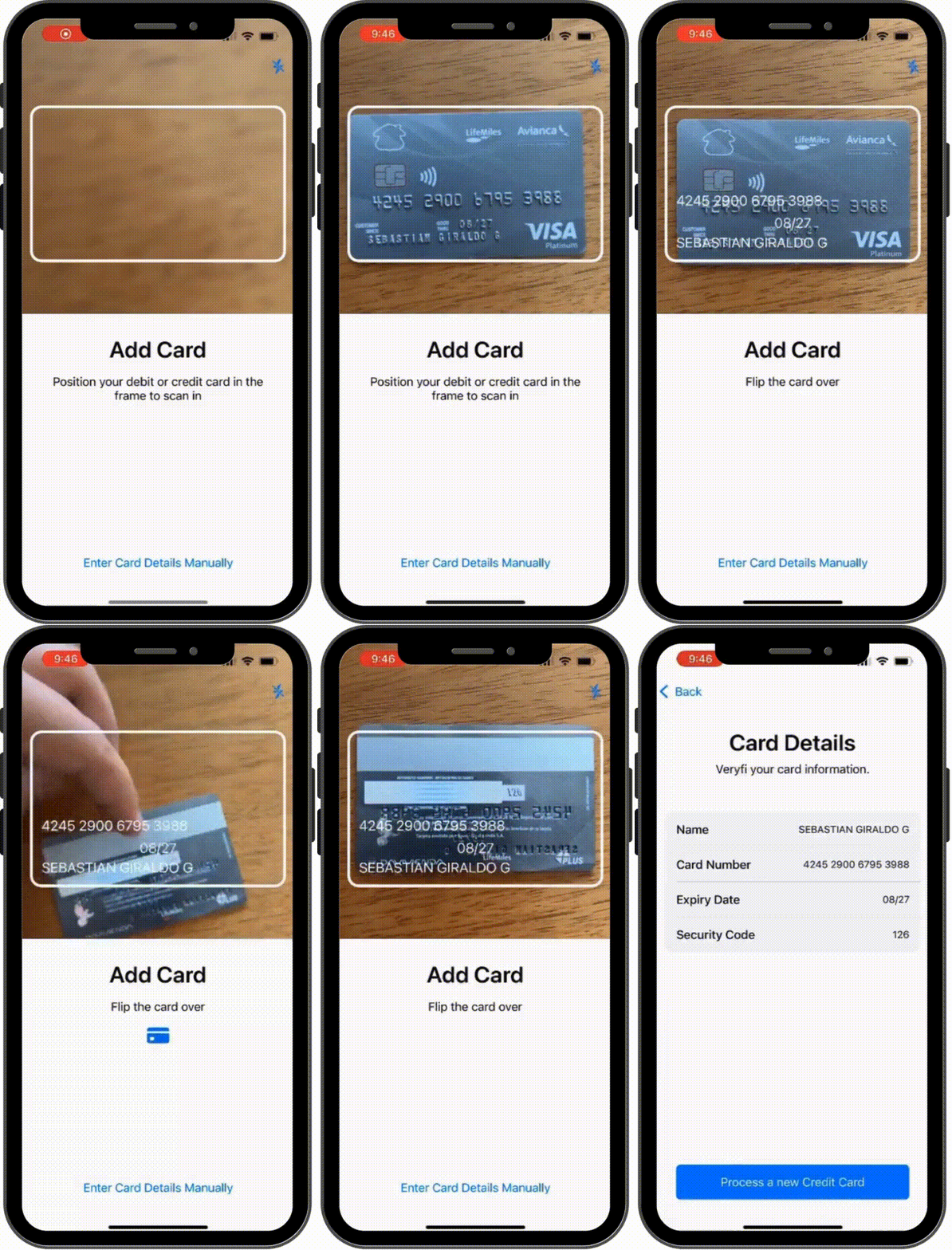
All credit card image processing and data extraction is performed entirely on the device, without being sent over the internet.
Veryfi Lens runs a light machine model to perfect the capture of your customers' credit cards. Veryfi Lens runs a machine model which is trained to distinguish a credit card from its surroundings, including other hard edges and similarly colored surfaces. This means there is no need for guides or messages in app to tell your customer how to position the card. They can hold it in their hand or on any surface and the machine model inside Veryfi Lens will identify the card and extract all the data on both sides. This makes the experience of capturing card information super seamless and pain free.
Veryfi Lens includes Al computer vision and custom camera features that optimize image quality based on surroundings to ensure the greatest possible data extraction accuracy. The real-time Veryfi Lens computer vision model recognizes low light situations and automatically enables the device’s torch/flashlight to ensure high-quality credit card capture.
Veryfi Lens can be configured to automatically capture the credit card without pressing the capture button. The machine model inside Veryfi Lens will calculate when it sees the card to automatically snap the picture for you ready for your preview. Technology should make your customer's life easier, not harder.
You can take advantage of all the AI and machine model without the default graphical user interface that comes prepackaged with Veryfi Lens. This way you can control the UI/UX experience while still providing powerful AI features to your customers.
Ship projects faster and achieve peace of mind using our Free SDKs
Same on-device Lens capture, different workflows. Jump from a card or start with what Veryfi extracts from a credit card.