
Bank Check OCR API | MICR, Fraud, X9 & ACH

Veryfi’s bank check OCR and fraud API reads the front and back of a check, returns MICR, amount, payee, signature, and endorsement as JSON, and scores the check for fraud before you deposit it. The same response can include an X9.37 file and a NACHA ACH entry.

Get Started for Free Free Demo
Bank Check OCR API | MICR, Fraud, X9 & ACH

POST /api/v8/partner/checks · Live

Check in. JSON out.

Veryfi’s Bank Check OCR API reads the front and back of a check and returns MICR, amount, payee, signature, and endorsement as JSON via POST /api/v8/partner/checks. Remote deposit, accounts payable, and fraud review use that payload — and can take an X9.37 cash letter or a NACHA ACH entry from the same response — instead of keying the MICR line by hand. See supported check fields and the Process a Check docs.

0 fields snapping into JSON

What is a bank check?

A bank check is a written order to pay money from an account. The face names the payer, the payee, the date, the courtesy amount, the legal amount in words, and a memo. The MICR line along the bottom encodes the routing number, account, and serial so a bank can clear it.

Remote deposit and Check 21 turn that paper into images. The API above returns those same fields as JSON, plus endorsement, fraud signals, and optional X9 or ACH when you ask for them.

Did you know

When the written words and the figures disagree, the words are the legal amount. The figures in the box are only the courtesy amount.

Most targeted payment method

Bank Checks are the most frequently targeted payment method.

63% of orgs report check fraud activity — more than ACH, wires, or cards. Checks stay the easiest instrument to steal, alter, and cash.

— AFP Payments Fraud and Control Survey (2025)

Check Extraction 3.0

AI Detects & Crops Checks on any background even white on white BUT will not detect non-check objects Empower Your Business, Delight Your Customers: In today’s fast-paced market, cutting-edge technology isn’t a luxury—it’s survival. Smart businesses processing checks harness machine vision, AI, and data to outpace competitors, delight customers, and redefine industries. If your mobile app struggles to capture check images in various conditions, it’s time to upgrade to a platinum solution like Veryfi. Our technology excels at snapping checks in any situation, on any background both front & back without the visual constraints that other apps impose on their users. Embrace innovation or risk obsolescence. The future is now—are you leading or following?

What is Check Deposit OCR?: Check deposit OCR (Optical Character Recognition) is AI-powered technology that automatically reads and extracts data from bank checks — including MICR codes, amounts, payee names, and routing numbers — enabling digital check processing without manual data entry.

Let’s Veryfi It

Interactive sample for service illustration. Test drive Veryfi — 14-day free trial, or speak to a Veryfi Expert.

Front of check
Bart Simpson1840 Market Street
San Francisco, CA 94102
JPMorgan Chase383 Madison Avenue · New York, NY 10179
Check 118408359 Date 04 Oct 2021 0210-0002/1
Pay to the order of
PG&E
$ 247.18
Memo Power, gas & electricity
Authorized signatureNo signature
⑈021000029⑈ 031923284⑆ 118408359

Bart Simpson1840 Market Street
San Francisco, CA 94102
JPMorgan Chase383 Madison Avenue · New York, NY 10179
Check 118408359 Date 04 Oct 2021 0210-0002/1
Pay to the order of
PG&E
$ 247.18
Memo Power, gas & electricity
Authorized signatureB. Simpson
⑈021000021⑈ 031923284⑆ 118408359
Back of check
Endorse here

Payee must sign below. For mobile deposit, check the box and do not cash this item.

Endorsement is not signed
Endorse here

Payee must sign below. For mobile deposit, check the box and do not cash this item.

PG&E
Forensic inspect

Supported Fields

Personal, business, and government checks extracted as JSON from POST /api/v8/partner/checks, including MICR, handwritten fields, void terms, endorsement checkboxes, X9 image exchange, and ACH.

  • MICR (Magnetic Ink Character Recognition)
    • Routing Number
      micr.routing_number
      The routing number is the nine-digit ABA number in the MICR line. It identifies the bank that holds the account.What it is
      • Nine digits. The check digit is the last one
      • Part of the MICR line, printed in magnetic ink
      • The bank, not the account and not the check serial
      Where to find it
      • Along the bottom of the check, between the transit symbols
      • On a US check it is the first number group in the MICR line
      Read it with
      • Account number and serial number, the other MICR groups
      • Fractional routing number, the fraction printed at the upper right
      021000029
    • Account Number
      micr.account_number
      The account number is the MICR group that identifies the account the funds are drawn on.What it is
      • Unique to the account holder at that bank
      • Length and position vary by bank
      • Not the routing number and not the check number
      Where to find it
      • In the MICR line at the bottom, after the routing number on a US personal check
      Read it with
      • Routing number
      • Payer name, the person or business that owns the account
      031923284
    • Serial Number
      micr.serial_number
      The serial number is the check number encoded in the MICR line. It identifies this check in the account's sequence.What it is
      • The MICR copy of the check number
      • Should match the number printed at the top right
      • A mismatch is a reason to look at the image
      Where to find it
      • In the MICR line, often the last group on a US personal check
      • Also printed as the check number in the upper right
      Read it with
      • Check number, the human-readable number
      118408359
    • Raw Text
      micr.raw
      Raw MICR text is the MICR line as it was read, including the transit, on-us, and dash symbols, before it is split into routing, account, and serial.What it is
      • The unparsed line from the bottom of the check
      • Useful when a parsed field looks wrong
      • Includes symbol characters that are not part of the account number
      Where to find it
      • The magnetic-ink line along the bottom edge
      Read it with
      • Routing number, account number, and serial number
      A021000029A 031923284C118408359
    • Branch
      micr.branch
      Branch is the branch number in a Canadian MICR line. It identifies the branch that holds the account.What it is
      • Used on Canadian checks. US ABA checks leave it empty
      • A branch of the institution, not the whole bank
      • Read from the MICR line, not from the address block
      Where to find it
      • In the Canadian MICR encoding at the bottom of the check
      Read it with
      • Institution
      • Routing number, which is the US equivalent idea
      12345
    • Institution
      micr.institution
      Institution is the financial institution number in a Canadian MICR line. It distinguishes the bank or credit union.What it is
      • A Canadian MICR field. Blank on a typical US check
      • The institution, not the branch and not the account
      • Not the bank name printed in words
      Where to find it
      • In the Canadian MICR line at the bottom
      Read it with
      • Branch
      • Bank name, the words printed on the check
      003
    • Transaction Code
      micr.transaction_code
      The MICR transaction code says what kind of item this is, such as a checking debit or a savings item, inside the MICR line.What it is
      • A code in the MICR line, not the two-digit NACHA transaction code in the ACH group
      • Common on Canadian checks. Many US personal checks do not print one
      • Describes the item type, not the dollar amount
      Where to find it
      • In the MICR line at the bottom of the check
      Stays separate from
      • The ACH Transaction code, which is a different number for a NACHA file
      450
    • Learn more …
  • Numbers
    • Amount
      amount
      Amount is the numeric courtesy amount, the figures in the amount box.What it is
      • The dollar value printed or written in numbers
      • The figure a teller reads first
      • Compared with the written amount when they disagree
      Where to find it
      • The amount box on the right side of the check, next to the dollar sign
      Read it with
      • Amount text and amount text value
      $247.18
    • Amount Text
      amount_text
      Amount text is the legal amount written out in words, such as One hundred and 00/100.What it is
      • The words on the legal-amount line
      • Controls when the words and the figures disagree
      • Kept as text, not converted to a number in this field
      Where to find it
      • The line that ends in Dollars, under the payee name
      Read it with
      • Amount text value, the number parsed from those words
      • Amount, the figures
      Two Hundred Forty-Seven And 18/100
    • Amount Text Value
      amount_text_value
      Amount text value is the number read from the written legal amount, so you can compare it with the courtesy amount.What it is
      • A number derived from the words, not a second box on the check
      • Use it to catch a courtesy amount that does not match the words
      • Empty when the words could not be parsed
      How to use it
      • Computed from the legal-amount line. It is not printed as its own figure
      Read it with
      • Amount
      • Amount text
      247.18
    • Fractional Routing Number
      fractional_routing_number
      The fractional routing number is the fraction printed at the upper right. It is an older way to identify the bank.What it is
      • Looks like a fraction, often with a hyphen
      • A backup for the nine-digit routing number
      • Not the MICR line itself
      Where to find it
      • Upper right of the check, near the check number
      Read it with
      • Routing number
      • Routing from fractional
      0210-0002/1
    • Routing From Fractional
      routing_from_fractional
      Routing from fractional is the nine-digit ABA routing number derived from the fraction at the upper right.What it is
      • Computed from the fraction. It is not a second MICR read
      • Should match micr.routing_number on a normal US check
      • A mismatch is a reason to review the image
      How to use it
      • Derived from the upper-right fraction
      Read it with
      • Fractional routing number
      • MICR routing number
      021000021
    • Check Number
      check_number
      The check number is the sequential number printed on the check so this item can be told apart from the rest of the book.What it is
      • The human-readable serial, usually at the top right
      • Should match the MICR serial number
      • Not the routing number
      Where to find it
      • Upper right, and sometimes repeated at the bottom
      Read it with
      • MICR serial number
      118408359
    • Currency Code
      currency_code
      Currency code is the ISO 4217 code for the amount, such as USD or CAD.What it is
      • The currency of the amount, not a conversion
      • USD for a typical US personal check. CAD when the check is Canadian
      • Not printed as the letters USD on every check. It is inferred
      How to use it
      • Use it before you post the amount into a ledger that mixes currencies
      Read it with
      • Amount
      • Check type
      USD
    • Check Type
      check_type
      Check type is the kind of check, such as personal, business, cashier's, or government.What it is
      • A classification of the item, not a number from the MICR line
      • Personal and business checks are drawn on a customer account. Cashier's checks are drawn on the bank
      • Useful for risk rules that treat those items differently
      How to use it
      • Inferred from the layout, the payer, and the wording on the check
      Read it with
      • Payer name
      • Bank name
      personal_check
    • Memo
      memo
      The memo is the note on the memo line. People use it for an invoice number, an account, or what the payment is for.What it is
      • Free text. It is not required for the check to be negotiable
      • Often handwritten
      • Not the payee and not the legal amount
      Where to find it
      • The memo line at the lower left, labeled Memo or For
      Read it with
      • Amount
      • Receiver name
      Power, gas & electricity
    • Void Terms
      void_terms
      Void terms are phrases on the check that say it is void, such as void after 90 days or a stamped VOID.What it is
      • The wording that limits or cancels the item
      • A voided check should not be deposited
      • Separate from a fraud score. This is text printed on the check
      Where to find it
      • Anywhere the printer or a stamp put the word void, often across the face or under the amount
      Read it with
      • Fraud score
      • Tags
      VOID AFTER 90 DAYS
    • Learn more …
  • Bank Info
    • Bank Name
      bank_name
      Bank name is the name of the bank printed on the check, the institution the routing number points at.What it is
      • The words on the check, such as the bank's logo name
      • Not the nine-digit routing number
      • The drawee bank, not the depositor's endorsement bank
      Where to find it
      • Usually the left side or the top, with the bank logo
      Read it with
      • Routing number
      • Bank address
      JPMorgan Chase
    • Bank Address
      bank_address
      Bank address is the address printed for the issuing bank or branch.What it is
      • The bank's printed location, not the payer's home address
      • May be a main office rather than the branch that opened the account
      • Often sits under the bank name
      Where to find it
      • Beside or under the bank name
      Read it with
      • Bank name
      • Payer address
      383 Madison Avenue, New York, NY 10179
    • Learn more …
  • X9 (Check Image Standard)
    • File Header ID
      File header ID is the identifier of an X9 cash-letter file, the image-exchange bundle this check belongs to.What it is
      • An X9 image-exchange field, not a value read off a paper check by Process a Check
      • Identifies the file, not the individual check
      • Used when you are looking at a Check 21 cash letter
      Where it lives
      • In the X9 file header record
      • Keep this group even though Process a Check does not return it
      Read it with
      • Item sequence number, which identifies one check inside that file
      X9-1184
    • Item Sequence Number
      Item sequence number is the order of this check inside an X9 bundle.What it is
      • A sequence inside the cash letter, not the check number printed on the paper
      • Used to reconcile an image file back to a deposit
      • An X9 field, separate from the Process a Check response
      Where it lives
      • In the X9 item record for this check
      Read it with
      • Check number
      • File header ID
      001
    • Image Format
      Image format is how the check image is encoded inside the X9 file. Check 21 cash letters typically use TIFF Group 4.What it is
      • The encoding of the image, not a description of the paper
      • Needed before you decode the front or back image
      • An X9 field, not a Process a Check key
      Where it lives
      • In the X9 image-view record
      Read it with
      • Front image
      • Back image
      TIFF6
    • Front Image
      Front image is the front of the check as carried in the X9 file, typically the base64 image bytes.What it is
      • The face of the check: payer, amount, signature, MICR
      • An image payload, not the extracted amount
      • Part of the X9 cash letter, not the Process a Check JSON
      Where it lives
      • The front image view in the X9 item
      Read it with
      • Back image
      • Image format
      b64_front==
    • Back Image
      Back image is the rear of the check in the X9 file, where the endorsement usually sits.What it is
      • The back, including stamps and the endorsement signature
      • An image payload from the cash letter
      • Not the endorsement true or false flags from Process a Check
      Where it lives
      • The back image view in the X9 item
      Read it with
      • Is endorsed
      • Endorsement is signed
      b64_back==
  • Signatures & Endorsement
    • Is Signed (Front of Check)
      is_signed
      Is signed says whether a signature is present on the front of the check, on the maker's signature line.What it is
      • True or false for the front signature
      • A missing signature is a reason to review before deposit
      • Not the endorsement on the back
      Where to find it
      • The signature line at the lower right of the front
      Read it with
      • Endorsement is signed, the back
      • Is endorsed
      false
    • Endorsement Is Signed (Back of Check)
      endorsement.is_signed
      Endorsement is signed says whether the back of the check has an endorsement signature.What it is
      • True or false for a signature on the back
      • The payee normally signs the back before deposit
      • Separate from the maker's signature on the front
      Where to find it
      • The endorsement area on the back
      Read it with
      • Is signed, the front
      • Is endorsed
      false
    • Is Mobile / Remote Deposit Only
      endorsement.is_mobile_or_remote_deposit_only
      This flag is true when the check says it may only be deposited by mobile or remote deposit.What it is
      • A restriction printed on the back
      • Depositing it over the counter can violate the instruction
      • Not the same as the checkbox being ticked
      Where to find it
      • On the back, in the endorsement area, often as For mobile deposit only
      Read it with
      • Mobile deposit checkbox
      • Mobile deposit instructions
      true
    • Is Endorsed
      endorsement.is_endorsed
      Is endorsed says whether any endorsement is present on the back, signature or otherwise.What it is
      • True when the back shows an endorsement
      • Broader than a signature. A stamp can count
      • The payee endorses before the bank accepts the item
      Where to find it
      • The back of the check, in the endorsement band
      Read it with
      • Endorsement is signed
      • Back image, when you are in an X9 file
      false
    • Mobile Deposit Checkbox
      endorsement.mobile_or_remote_deposit.checkbox
      Mobile deposit checkbox is true when the For mobile deposit only box on the back is checked.What it is
      • The checkbox itself, not the surrounding sentence
      • Checked means the restriction was marked
      • Blank when the check has no such box
      Where to find it
      • On the back, next to the mobile-deposit wording
      Read it with
      • Is mobile or remote deposit only
      • Mobile deposit instructions
      true
    • Mobile Deposit Instructions
      endorsement.mobile_or_remote_deposit.instructions
      Mobile deposit instructions is true when the back prints directions for a mobile or remote deposit.What it is
      • The presence of the instruction text
      • Can be true even when the checkbox is not marked
      • Tells the depositor how the bank expects the item to be sent
      Where to find it
      • On the back, in the endorsement area
      Read it with
      • Mobile deposit checkbox
      true
  • Meta
    • OCR Text
      text
      OCR text is the full text read from the check image, in reading order, before you rely on the individual fields.What it is
      • A single string of everything recognized on the image
      • Useful when a structured field is empty and you need the raw line
      • Not a field printed as its own label on the check
      How to use it
      • Search it when a structured value looks truncated
      • Do not parse it in place of MICR when micr.raw is present
      Pay to the order of PG&E
    • Date
      date
      The date is the date written on the check, the day it was issued or the day it may be paid.What it is
      • The date on the face, not the day Veryfi processed the image
      • A post-dated check is not the same as the created date
      • Often handwritten
      Where to find it
      • The date line at the upper right
      Stays separate from
      • Created date, which is the processing timestamp
      2021-10-04
    • Payer Name
      payer_name
      Payer name is the person or business that issued the check, the account holder the money is drawn from.What it is
      • Printed at the upper left on a personal or business check
      • The maker, not the payee
      • Should belong to the account in the MICR line
      Where to find it
      • Upper left of the front, above the payer address
      Read it with
      • Receiver name, the payee
      • Account number
      Bart Simpson
    • Payer Address
      payer_address
      Payer address is the address printed with the person or business that issued the check.What it is
      • The maker's address, not the bank's and not the payee's
      • Often under the payer name
      • Used to match the customer in your system
      Where to find it
      • Upper left, under the payer name
      Read it with
      • Payer name
      • Bank address
      1840 Market Street, San Francisco, CA 94102
    • Receiver Name
      receiver_name
      Receiver name is the payee, the person or business the check is payable to.What it is
      • The name on the Pay to the order of line
      • May be handwritten
      • The party who must endorse the back
      Where to find it
      • The payee line, in the middle of the front
      Read it with
      • Payer name
      • Is endorsed
      PG&E
    • Receiver Address
      receiver_address
      Receiver address is the payee's address when the check prints one.What it is
      • Optional. Many checks leave it blank
      • The payee's address, not the payer's
      • Sometimes written under the payee name
      Where to find it
      • Near the payee line, when it is present
      Read it with
      • Receiver name
      • Payer address
      San Francisco, CA
    • Created Date
      created_date
      Created date is when Veryfi first stored this check. It is a processing timestamp, not the date written on the check.What it is
      • Set once, when the check is processed
      • Does not move when you only read the record again
      • Not printed on the check
      How to use it
      • Store it as the intake time
      • Do not use it as the issue date
      Read it with
      • Date, the date on the check
      • Updated date
      2021-10-04 16:12:08
    • Updated Date
      updated_date
      Updated date is the last time this check record changed, such as a reprocess or an edit.What it is
      • Moves forward when the record changes
      • Equal to created date until something updates the document
      • Not the date on the check
      How to use it
      • Compare it with created date to see whether the record was touched after intake
      Read it with
      • Created date
      • Date
      2021-10-04 16:12:12
    • PDF URL
      pdf_url
      PDF URL is a signed link to a PDF of the processed check. The link expires and is re-signed on later reads.What it is
      • A URL, not the image bytes
      • Short-lived. Do not store it as a permanent file location
      • Not printed on the check
      How to use it
      • Download it when you need a PDF copy for a case file
      • Fetch the document again when the link has expired
      https://cdn.veryfi.com/.../check.pdf
    • Thumbnail URL
      img_thumbnail_url
      Thumbnail URL is a signed link to a small preview of the check image.What it is
      • A reduced image for a list or a queue
      • Expires the same way the PDF link does
      • Not the full-resolution scan
      How to use it
      • Use it in a review screen
      • Use the PDF or the original upload when you need detail
      https://cdn.veryfi.com/.../thumbnail.jpg
    • Learn more …
  • Quality
    • OCR Score
      ocr_score
      OCR score is how confident text recognition was for this image, from 0 to 1.What it is
      • A quality signal for the page, not a guarantee on every field
      • Lower scores usually mean blur, a tight crop, or a low-contrast photo
      • Not printed on the check
      How to use it
      • Review extractions under your own threshold before they post
      • Pair it with blur and fraud signals
      0.98 (98%)
    • Is Blurry
      meta.pages[].is_blurry
      Is blurry says the check image is too soft for a reliable read, with a confidence that it is blurry.What it is
      • A capture-quality flag, not a field on the paper
      • True means you should ask for another photo
      • One value per page
      How to use it
      • Retake when it is true and the amount or MICR is empty
      • A sharp image can still have a low OCR score for other reasons
      false
    • Is Front
      meta.pages[].is_front
      Is front says this page is the front of the check rather than the back.What it is
      • True for the face, false for the endorsement side
      • Lets you apply front rules and back rules to the right image
      • Not printed on the check
      How to use it
      • Use it before you look for a maker signature or a payee
      • The back is where is endorsed applies
      true
    • Page width
      meta.pages[].width
      Page width is the processed image width in pixels. Together with page height it is the coordinate space for anything you draw on the scan.What it is
      • Pixel width of the image Veryfi processed
      • Not the physical width of the paper
      • One value per page, under meta.pages
      How to use it
      • Scale boxes onto the original photo
      • Spot a tiny or oddly cropped upload
      Read it with
      • Page height
      1458 pixels
    • Page height
      meta.pages[].height
      Page height is the processed image height in pixels.What it is
      • Pixel height of the image Veryfi processed
      • Not the physical height of the check
      • One value per page
      How to use it
      • Pair it with page width before you map coordinates
      • A very short image often means the check was cropped
      Read it with
      • Page width
      644 pixels
  • Duplicate Detection & Tags
    • Duplicates
      duplicates
      Duplicates lists earlier check records that match this submission, so the same item is not deposited twice.What it is
      • Each match has its own document id
      • An empty list means no prior copy was found
      • Not printed on the check
      How to use it
      • Block or review a deposit when the list is not empty
      • Open the earlier document before you decide it is the same check
      []
    • Tags
      tags
      Tags are labels applied to the check record, including validation results such as a void flag.What it is
      • System labels, not text the account holder wrote in the memo
      • A tag such as a void validation points at a problem with the item
      • Not printed as a field on the check
      How to use it
      • Read them in the review queue before posting
      • They sit alongside the fraud and void signals
      Read it with
      • Void terms
      • Fraud types
      []
    • Document ID
      id
      Document ID is Veryfi's identifier for this processed check. It is assigned at upload. It is not printed on the check.What it is
      • The key you use to fetch this extraction later
      • Stays with this document even if a later upload is a new id
      • Not the check number
      How to use it
      • Store it beside the deposit in your system
      • Pass it when you need this JSON again
      118408359
    • External ID
      external_id
      External ID is your own identifier, echoed back from the request. Use it to match this JSON to a deposit or a customer in your system.What it is
      • Optional. You send it. Veryfi does not read it off the check
      • Blank when the request did not include one
      • Not the document id
      How to use it
      • Send the id of your transaction when you upload
      • Read it back to join the JSON to your database
      EXT-1184
    • Custom Fields
      custom_fields
      Custom fields are key-value pairs you attach to the check record for your own metadata.What it is
      • Whatever you stored. They are not read from the image
      • A map, empty when you did not send any
      • Not a substitute for the extracted amount or MICR
      How to use it
      • Put your case id, teller id, or channel here when you create the document
      • Read them back on the same record
      {}
  • ACH (Automated Clearing House)
    • Transaction Code
      The ACH transaction code is the two-digit NACHA code for the account type and the direction of the entry, such as 22 for a checking credit or 27 for a checking debit.What it is
      • A NACHA field for moving the payment through ACH
      • Not the MICR transaction code on the check image
      • This group is the ACH story. It is not a Process a Check response key
      Where it lives
      • In the ACH entry detail record you build from the check
      Stays separate from
      • MICR transaction code, which is a different field on the check
      27
    • Company ID
      Company ID is the ten-digit identifier the originating company's bank assigns for ACH batches.What it is
      • Identifies the company originating the ACH file
      • Not the EIN on a W-2 and not the check payer's account number
      • An ACH field, kept here so the payment side is documented with the check
      Where it lives
      • In the ACH batch header
      Read it with
      • Payer name
      • Account number
      1234567890
    • SEC Code
      SEC code is the three-letter Standard Entry Class code. It says what kind of ACH payment this is and how it was authorized.What it is
      • PPD is a consumer payment. CCD is a corporate credit or debit
      • Chooses the rules for the entry, not the dollar amount
      • An ACH field, not printed on the check
      Where it lives
      • In the ACH batch header, with the company name
      ARC
    • Trace Number
      The trace number is the fifteen-digit id the originating bank assigns so one ACH entry can be found later.What it is
      • The first eight digits are the originating routing number. The rest are a sequence
      • The handle for a return or a question about that entry
      • Not the check number
      Where it lives
      • In the ACH entry detail record
      Read it with
      • Check number
      • Routing number
      071000013
    • Effective Date
      The ACH effective date is the date the originator wants the entry to settle, written as YYMMDD in the NACHA file.What it is
      • The settlement date the company requested, not a promise of the posting date
      • Not the date written on the check
      • An ACH field
      Where it lives
      • In the ACH batch header
      Stays separate from
      • Date, the date on the check
      211006
    • Individual Name
      Individual name is the receiver's name as it is placed in the ACH entry detail, so the receiving bank can match the account.What it is
      • The name on the ACH entry, up to the NACHA length
      • Usually the payee or the account holder you are paying or debiting
      • Not a separate line item extracted as its own Process a Check key
      Where it lives
      • In the ACH entry detail record
      Read it with
      • Receiver name
      • Payer name
      Bart Simpson
  • Fraud and handwriting
    • Handwritten Fields
      handwritten_fields
      Handwritten fields lists the extracted keys that were written by hand rather than printed.What it is
      • A list of field names, such as the amount or the payee
      • Handwriting is normal on a personal check. It is a signal, not fraud by itself
      • Empty when the detected fields were printed
      How to use it
      • Use it to decide which values deserve a second look
      • Pair it with the fraud score when a printed check has unexpected handwriting
      [memo]
    • Digital Tampering Fields
      digital_tampering_fields
      Digital tampering fields lists the extracted keys that show signs of being altered in the image.What it is
      • A list of field names, not a second copy of the values
      • A tampered amount or payee is a reason to stop the deposit
      • Empty when no field was flagged
      How to use it
      • Review every listed field against the image before posting
      • Read it with the fraud score and fraud types
      [micr.raw]
    • Four Corners Detected
      four_corners_detected
      Four corners detected says all four corners of the check are visible inside the photo.What it is
      • True when the whole check is in frame
      • A missing corner often means a crop that cut off MICR or the signature
      • Not printed on the check
      How to use it
      • Ask for a new photo when it is false
      • A true result does not by itself mean the image is sharp
      true
    • Front and Back Aspect Similarity
      front_back_aspect_similarity
      Front and back aspect similarity is how closely the front image and the back image match in shape.What it is
      • A comparison of the two sides' aspect ratios
      • A large gap can mean the two photos are not the same check, or one side is cropped
      • Not a value printed on the paper
      How to use it
      • Review pairs that score far apart before you accept the deposit
      • Use it with is front so you know which image is which
      1
    • Fraud Score
      fraud.score
      Fraud score is the detector's confidence that this capture is not a straight photo of a genuine check.What it is
      • A number. Higher means more risk signals
      • A review flag, not a decision to pay or return the item
      • Read it with fraud color and fraud types
      How to use it
      • Not printed on the check
      • Set your own threshold for a manual review
      0.88
    • Fraud Color
      fraud.color
      Fraud color is a simple band for the score so a reviewer can triage without reading the raw number.What it is
      • Green means the detector did not flag the item
      • Yellow means look at the image. Red means the detector called it fraud
      • Comes from the same signals as the score
      How to use it
      • Use yellow and red as the review queue
      • Do not treat green as a guarantee the check is good
      red
    • Fraud Types
      fraud.types
      Fraud types name the signals that fired, such as an LCD photo, a screenshot, a duplicate, or digital tampering.What it is
      • The reasons behind the score, not a second score
      • More than one type can appear on the same check
      • An empty list means nothing was flagged
      How to use it
      • Read the list before you decide why the color is not green
      • Match digital tampering here to digital tampering fields
      [digital tampering, missing signature, micr mismatch]
    • Learn more …
Request: Bank Check Data Extraction
import requests
url = "https://api.veryfi.com/api/v8/partner/checks"
headers = {
'CLIENT-ID': '<API_KEY_VALUE>',
'AUTHORIZATION': 'apikey <USERNAME_VALUE>:<API_KEY_VALUE>'
}
payload = {'file_url': 'https://cdn...'}
response = requests.post(url, headers=headers, data=payload)
print(response.json())
Response: Structured JSON with X9 & ACH
{
"bank_name": "Nationwide",
"bank_address": "PO Box 2344\nBrea, CA 92822-2344",
"check_number": "118408359",
"date": "2021-10-04",
"amount": 1308.45,
"amount_text": "One Thousand Three Hundred Eight And 45/100 Dollars",
"receiver_name": "Dmitry Birulia",
"receiver_address": "733 Long Bridge\nSan Francisco CA 94158",
"memo": "F-602441-2021092406733",
"category": "Restaurants / Dining / Meals",
"vendor": "DoorDash",
"micr": {
"routing_number": "0118408359",
"account_number": "031923284",
"serial_number": "8765129397"
},
"fractional_routing_number": "70-2328/719 IL",
"x9": {
"file_id": "X9-1184",
"item_seq": "001",
"image_format": "TIFF6",
"front_image": "b64_front==",
"back_image": "b64_back=="
},
"ach": {
"txn_code": "22",
"company_id": "1234567890",
"sec_code": "PPD",
"trace_num": "071000013",
"eff_date": "211006"
}
}

Developer Friendly API

The only API you will ever need to accurately extract key/value data in a standardized format you can trust across any geography, language, or format — enabling seamless international business expansion without lifting a finger.

Day-1 Ready Pre-Trained Bank Checks AI Model
SDKs & code samples in Python, Node.js, PHP, C#, Java, Go and more
Detailed API Docs + FAQs that make sense
Human support from experts at HQ in Silicon Valley

No bullshit. No months of training. No "contact sales" gatekeeping. Start impressing your customers today.

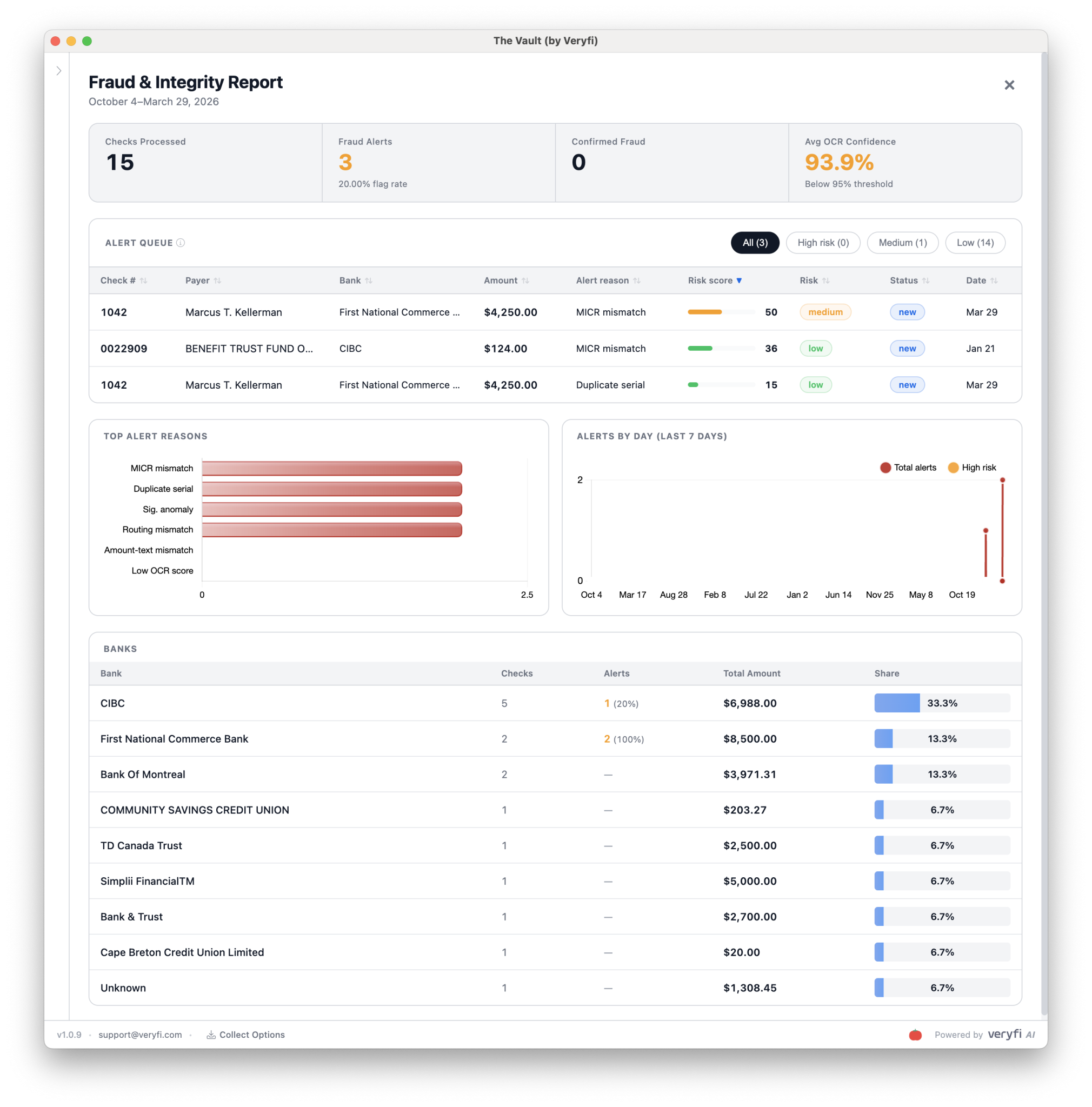
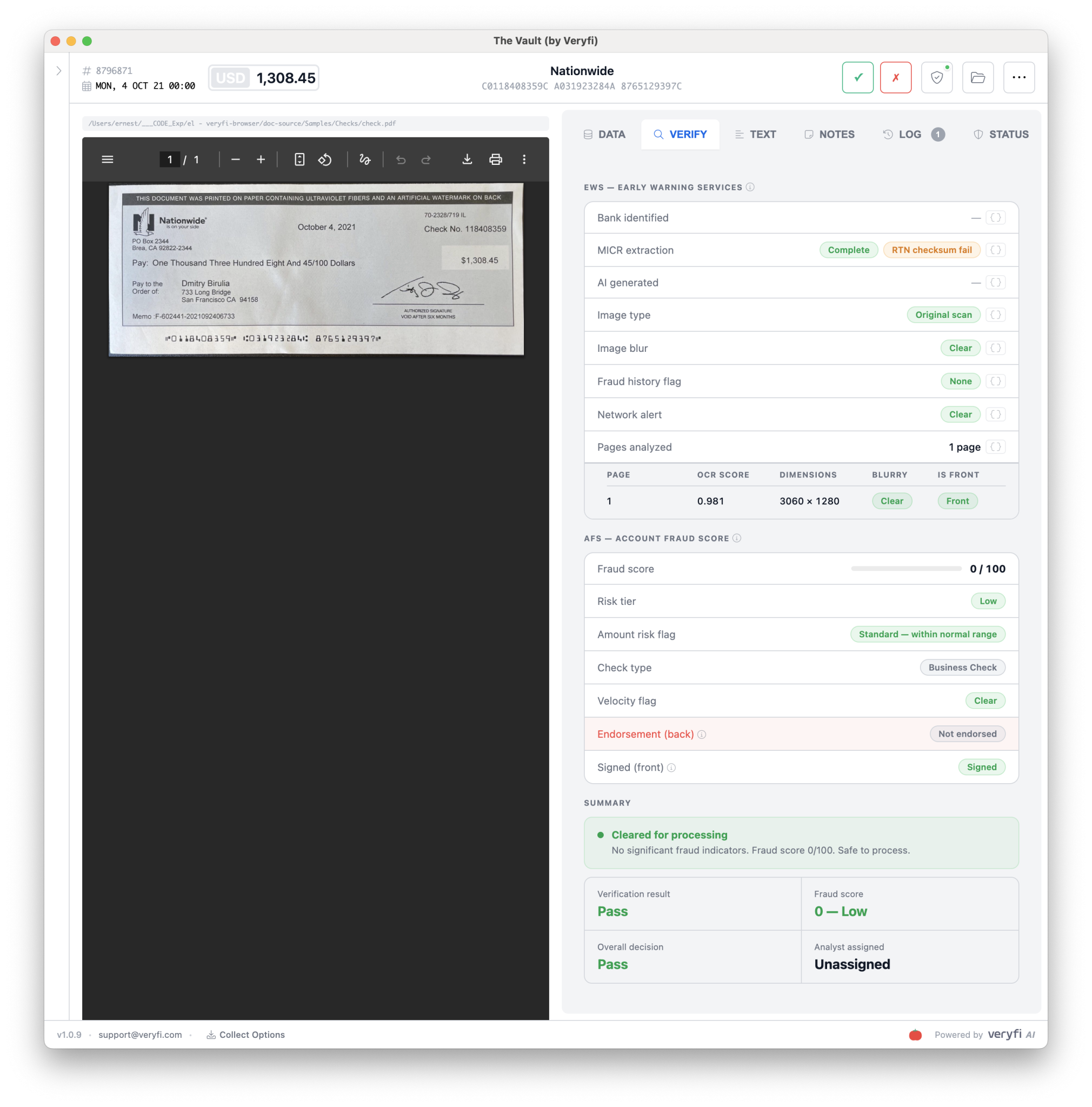
Your Real-Time Command Center for Fraud & Check Integrity

Processing a check is table stakes. Knowing *whether* you should — that's where the real value lives. Veryfi runs every check through two fraud intelligence layers, automatically, before you ever commit to a transaction:
  • - EWS (Early Warning Services) — the same risk intelligence network trusted by the largest banks in the U.S. It surfaces accounts flagged for fraud history, returns, or suspicious activity the moment a check hits your queue — not after the damage is done.
  • - AFS (Account Fraud Score) — a predictive risk score built specifically for that check-and-account combination. Not a blunt pass/fail. A precise, actionable number — so you can auto-approve the clean ones and route the risky ones for human eyes, without slowing down your entire operation.
EWS (Early Warning Services) & AFS (Account Fraud Score) Processing Checks using Veryfi API for DE & Fraud Detection

Veryfi Lens

Test Drive It on your Phone

Mobile Receipt Capture SDK

Replace your phone's camera with AI powered Lens by Veryfi to capture documents on the move, in any lighting conditions and even offline.

Free demo app for iPhone and Android. Scan the code or tap a store.

  • On-device extraction
  • Offline capture
  • Document AI detection
  • Burst mode for high-volume capture
  • Blur & not-document detection

or try just Check API extraction

SOC 2 Type II · Live

Global Bank-Grade Security & Compliance

Veryfi SOC 2 Type II compliant Certified seal

SOC 2 Type II

CERT · VERIFIED

Certified. GDPR, CCPA, and ITAR compliant.

HIPAA Compliance

HIPAA · BAA

We sign BAAs. PHI handled under HIPAA safeguards.

99.995% Uptime SLA

SLA · SAMPLED

Dedicated NVIDIA DGX — not shared cloud GPUs.

Deployment Flexibility

REGION · READY

Cloud API, hybrid, or on-premise when required.

GDPR

GDPR · READY

EU data protection. Lawful processing and subject rights.

Audit Trail

API · LOGGED

Every API call logged and timestamped for regulators.

Built for the banks that can’t afford “good enough.”

Use Cases

Same POST /api/v8/partner/checks payload, different workflows. Jump from a card or start with what Veryfi extracts from a bank check.

Frequently Asked Questions (FAQ)

  • How do I test this?

    Click the "GET STARTED FOR FREE" in the header and then signup for a free 14 day trial. It's that easy. No credit card required to trial the software for 14 days.

  • Where are the API docs?
  • Is there Fraud Detection?

    Yes. We have built a special AI-powered model which scrutinizes each check submission using various signals and triggers to flag potential fraud.

  • I want to talk to a person

    No worries. You can email our support on support@veryfi.com or contact our industry experts on sales@veryfi.com and they can guide you through all the available features.

  • Does it read handwritten text?

    Yes.

  • Do you have mobile check capture?

    Yes. You can try the mobile version from iOS App Store or Android Play Store

  • Does the API return an X9.37 file?

    Yes.

    Veryfi API can be configured to include X9 data structure in the JSON response file format or as a separate response/download.

    Modern solutions like Veryfi's bank check deposit platform leverage this X9.37 standard to provide seamless electronic check processing capabilities. By supporting the X9 format, Veryfi enables financial institutions and businesses to efficiently digitize and process check deposits while maintaining compliance with industry standards for electronic check exchange.

    The X9 format, specifically X9.37, is a standardized file format used in the banking industry for the electronic exchange of check and image data. It essentially acts as a digital container for check images and related information, enabling financial institutions to process check transactions electronically. This format allows for the exchange of both front and back images of checks, along with textual data describing the check items, facilitating the processing of both forward and return items.

  • Does the API return a NACHA ACH file?

    Yes.

    Veryfi API can be configured to include ACH data structure in the JSON response file format or as a separate response/download following NACHA format.

    The Automated Clearing House (ACH) network is the US electronic payment system managed by NACHA (National Automated Clearing House Association). An ACH file is a plain-text, fixed-width format where every record is exactly 94 characters wide. Banks use it for direct deposits, bill payments, and check conversion: turning a paper check into an electronic debit entry.

3 Pillars of AI Services

Day-one-ready white-label AI tools that make you the hero your customers have been waiting for. Things you can build
Agents that work with your data to handle complex tasks in real-time.