

Thinking Mode, our new agentic data extraction pipeline, is now available for receipts and invoices. Add one parameter, and a team of AI agents reviews the extraction, catches mistakes and corrects them before the results reach you.
Leave it off, and nothing changes: you still get structured data back in under three seconds. You decide, request by request, when a few extra seconds are worth higher accuracy.
The last mile of accuracy
Veryfi made its name on speed and accuracy. Dozens of proprietary models, built in-house and trained on millions of real documents, extract 99%+ accurate data in under three seconds.
At scale, though, the last percent is where the work hides. Even a 1% error rate on a million documents a month means 10,000 records someone has to find and fix. So teams build review queues, validation rules and exception workflows around their extraction.
Thinking Mode brings that second look into the API itself.
How Thinking Mode works
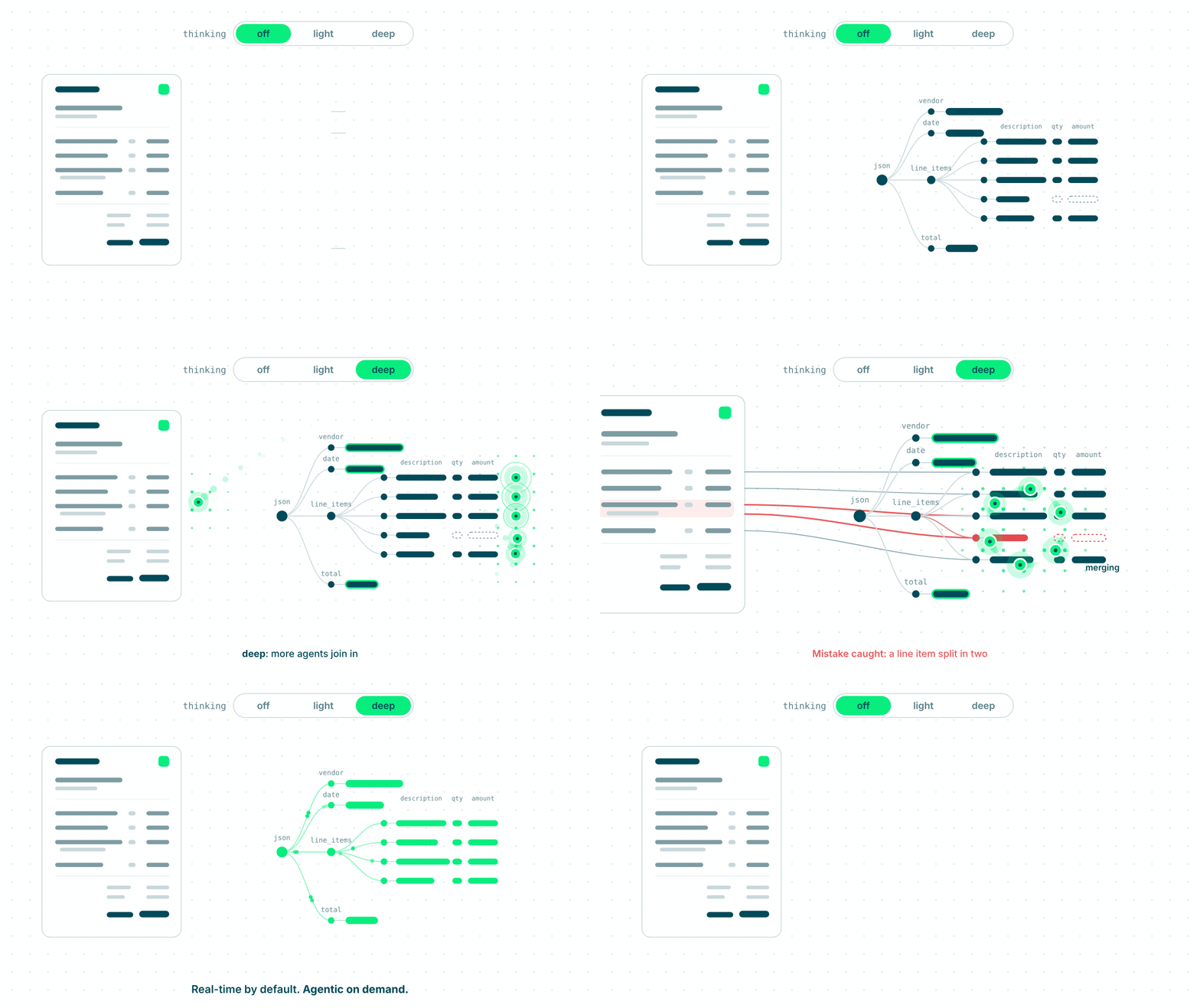
Every document still starts in our real-time pipeline, where our models extract the data. With Thinking Mode on, AI agents then join in. They review the extraction, catch mistakes and correct them before the response goes back to you.
Under the hood, the agents run a review loop:
- Read. They take the extraction from our models and the original document, side by side.
- Check. They re-read each field against the page. Then they test the numbers against each other: do the line items add up to the subtotal, and the subtotal plus tax to the total? Does each line’s quantity times unit price match its amount?
- Fix. When a check fails, they go back to the document and re-extract that field or row. Line items are the hardest part: a description that wraps onto a second line, two rows read as one, a row that gets skipped.
- Recheck. Every fix runs through the checks again before the result comes back to you.
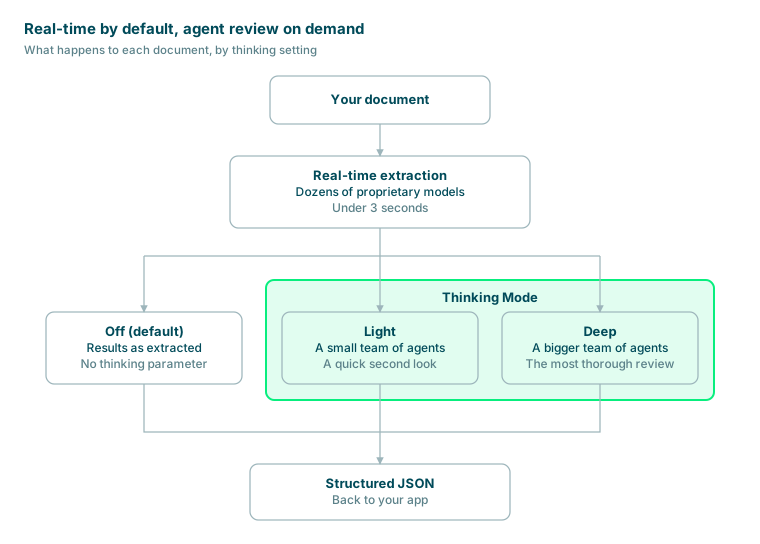
Thinking Mode flow · 3 settings
Leave thinking off and results come straight back. Set it to light or deep, and agents review them first.
Light or deep: you set how hard it thinks
Pick a setting per request. The deeper the review, the more agents join in.
| Setting | What happens | Best for |
|---|---|---|
| Off (default) | Our standard real-time pipeline, under 3 seconds per document | Live capture, where someone is waiting on the result |
| light | A small team of agents reviews the extraction and corrects what it finds | Everyday documents that deserve a quick second look |
| deep | A bigger team of agents runs the most thorough review | Hard or high-stakes documents, where accuracy beats speed |
Why Thinking Mode is different
Plenty of tools now offer agentic extraction. Four things set Thinking Mode apart:
- Real-time stays the default. Agentic review is opt-in, per request. Your live flows keep their sub-3-second answers, and you spend extra seconds only where they pay off.
- Two depths, not one switch. Light for a quick second look, deep for the full review. Match the effort to the document, not to your whole account.
- Agents start from a specialist’s answer. Thinking Mode’s agents don’t read your document cold. They start from the output of models we built in-house for documents like receipts and invoices. Like those models, the agents run on our own isolated infrastructure.
- Nothing to rebuild. It’s one parameter on the request you already send. No schema to write, no new endpoint, no pipeline to re-architect.
Where Thinking Mode pays off
Turn it on when a few extra seconds are worth higher accuracy:
- Accounts payable automation, where invoices post straight to your ERP with no human review
- Expenses and reimbursements, where one wrong total means a wrong payout
- Audit and compliance workflows, where every figure may be checked later
- Back-office and batch jobs, where nobody is waiting on a spinner
Skip it when you need an instant answer, like a customer snapping a receipt in your app. That’s what our real-time pipeline is for.
Get started
To enable the agentic modes on your account, message us in the Slack channel your team shares with Veryfi, or email support@veryfi.com.
Then add one parameter to your request:
curl -X POST https://api.veryfi.com/api/v8/partner/documents \
  -H "Content-Type: application/json" \
  -H "Client-Id: <client_id>" \
  -H "Authorization: apikey <username>:<api_key>" \
  -d '{
    "file_url": "https://example.com/invoice.pdf",
    "thinking": "deep"
  }'
New to the API? Start with our document processing guide.