





You built it right. The image is clean. The TIFF renders perfectly in every viewer you have. And the bank still rejected it.
Nine times out of ten, the problem is byte order. Not a corrupt file. Not a bad scan. Two bytes at the very start of the TIFF that say whether the rest of the file is little-endian or big-endian — and X9 has an opinion about which one you must use.
Here’s how it happened:
- Your software creates the TIFF.
- The TIFF writer chooses II (little-endian) or MM (big-endian), based on its configuration or defaults.
- Your X9 builder packages that TIFF as image data.
- If the TIFF starts with MM, it does not conform to X9.100-181 and the receiving institution may reject it.
This article walks through exactly what ANSI X9.100-181 requires, why it matters, the one gotcha that trips up even experienced developers, and what to do about it.
What byte order means in a TIFF
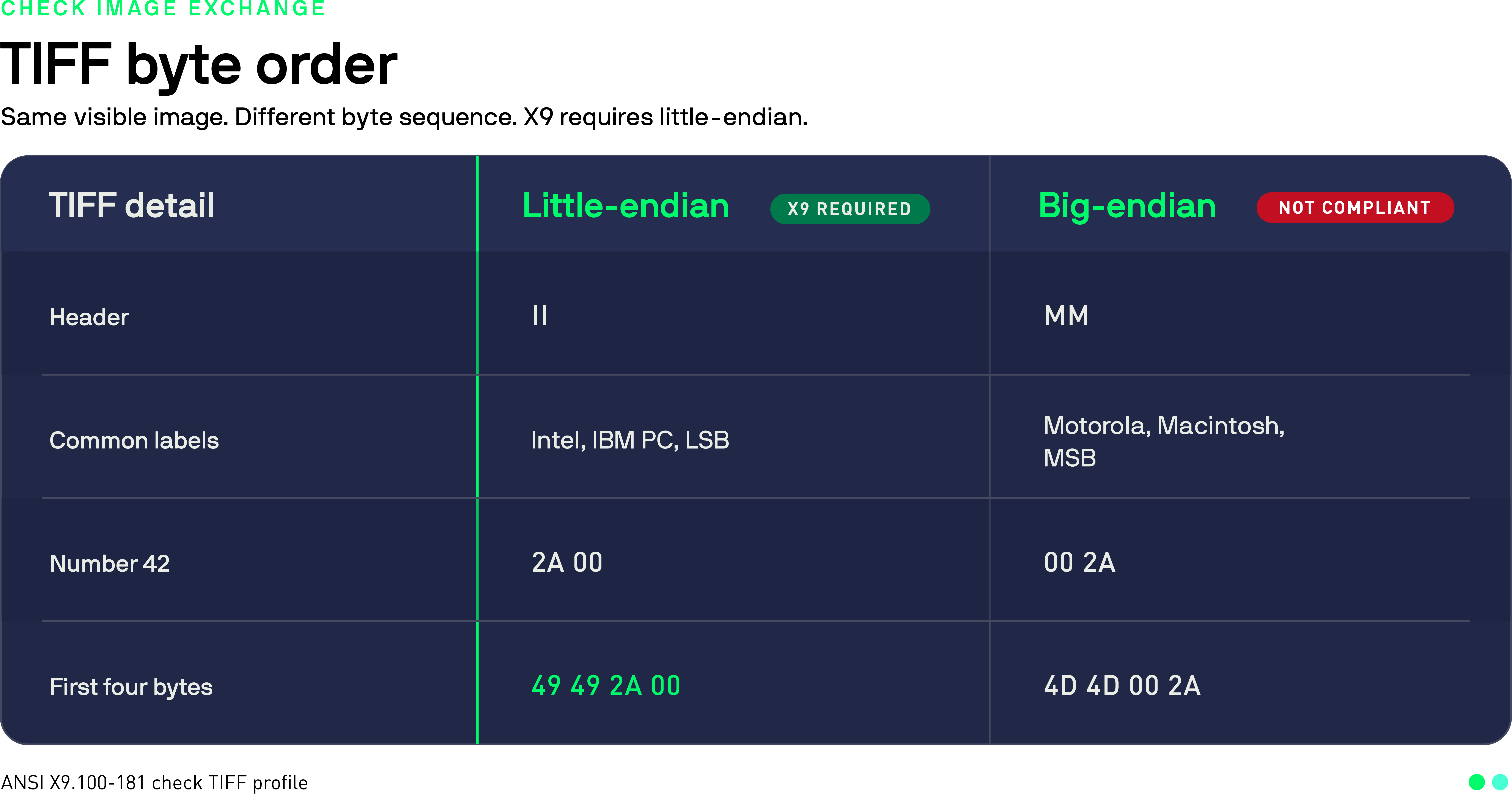
A TIFF file starts with a two-byte magic number that tells parsers how to read the rest of the file. Either:
- II (0x49 0x49) — little-endian, Intel byte order
- MM (0x4D 0x4D) — big-endian, Motorola byte order
In little-endian format, the least significant byte comes first. In big-endian, the most significant byte leads. For a 16-bit value like 0x0100, little-endian stores it as 00 01 in memory; big-endian stores it as 01 00.
Most modern processors (x86, ARM in standard mode) are little-endian, which is partly why II files are more common in practice. But plenty of imaging software still writes MM files by default, especially tools with Unix heritage or photographic workflows.
What X9.100-181 actually requires
ANSI X9.100-181 defines a TIFF 6.0 profile for check image exchange. Section 7 is explicit: the TIFF byte order must be little-endian, identified by II (49 49 in hexadecimal) in the first two bytes.
The goal is interoperability. TIFF 6.0 allows multiple valid representations, but financial institutions need a narrower profile that different readers and processing systems can handle consistently.
Beyond byte order, X9.100-181 also requires:
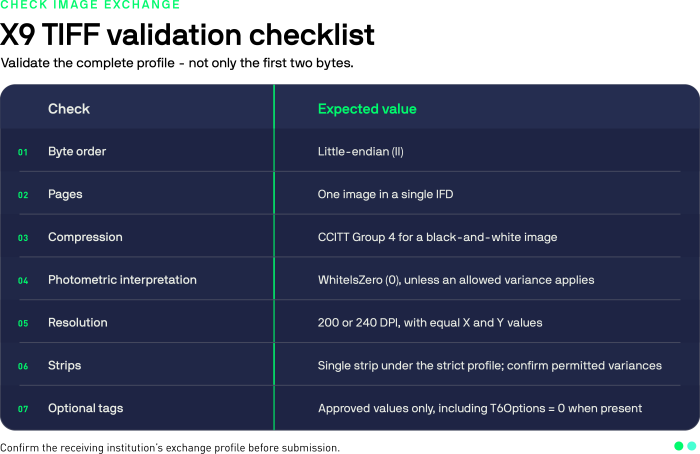
- Single page and single image view: one IFD per TIFF file
- Single strip: RowsPerStrip must be greater than or equal to ImageLength
- Compression and image data: Group 4 Fax (T.6), bilevel, with a valid EOFB
- Image profile: PhotometricInterpretation 0, Orientation 1, and matching X and Y resolution of exactly 200 or 240
A big-endian TIFF is nonconforming even if every viewer displays the image correctly.
The gotcha: X9 record length vs. TIFF byte order
Here is the part that catches people off guard.
An X9.100-187 image cash letter, often still called X9.37, can use variable-length records. In that format, the inserted 4-byte length field is big-endian, while the TIFF image data inside must be little-endian.
These rules operate in different scopes. The outer record framing uses big-endian for its inserted length field. The TIFF payload uses little-endian for its own structure. Both rules apply at the same time.
If you wrote a parser or builder by hand and assumed the outer framing dictated the inner byte order, that assumption is wrong. Validate the inserted length field and the TIFF header independently.
How to check your TIFF
There are three quick ways to verify byte order before you submit a file.
Option A: hex dump the first two bytes
On a system with head and xxd installed: head -c 2 image.tif | xxd
Output containing 4949 means little-endian (II). Output containing 4d4d means big-endian (MM). Anything else means the header does not contain a valid TIFF byte-order marker.
Option B: tiffdump
If you have libtiff installed: tiffdump image.tif
The first line of output includes the byte-order magic. Look for ‘Magic: 0x4949 (little-endian)’ or ‘0x4d4d (big-endian)’.
Option C: Python
with open('image.tif', 'rb') as f:
    magic = f.read(2)
    if magic == b'II':
        print('little-endian -- good for X9')
    elif magic == b'MM':
        print('big-endian -- needs conversion')
    else:
        print('not a valid TIFF')
That is the whole check. Two bytes. If you are building a validation pipeline, this should be the first thing you test, before you even look at compression or resolution.
How to convert a Big-endian TIFF to Little-endian
The simplest tool for this is tiffcp from the libtiff package. The -L flag forces little-endian output:
tiffcp -L input_MM.tif output_II.tif
That is it. The -B flag forces big-endian if you ever need that for a different standard, but for X9 you want -L.
Verify the result:
head -c 2 output_II.tif | xxd
# Expected: 4949 ...
If you are doing this at scale — processing thousands of checks per day — you probably want to catch and convert at ingestion rather than at submission. Failing at the bank’s endpoint costs more than catching it at yours.
Pillow normally writes little-endian TIFFs for common image modes, but it does not provide a documented save option for forcing byte order. If little-endian output is a hard requirement, use tiffcp -L and verify the resulting header before submission.
X9 TIFF validation checklist
Before submitting any check image to an X9 exchange, run through this list. Every item here corresponds to a rejection reason banks actually use.
How Veryfi’s Bank Check OCR API handles this
If you are building an RDC or check-processing workflow and would rather not manage TIFF validation, byte-order conversion, and X9 compliance by hand, Veryfi’s Bank Check OCR API handles it for you.
The API accepts check images in standard formats, extracts MICR line data (routing number, account number, check number), captures the dollar amount, date, payee, and memo fields, and returns structured JSON. The image compliance work happens on Veryfi’s side, so you get clean data back without needing to build a validation pipeline yourself.
Useful if you are processing checks at volume, building an RDC product, or just need reliable check data extraction without the infrastructure overhead.
References: