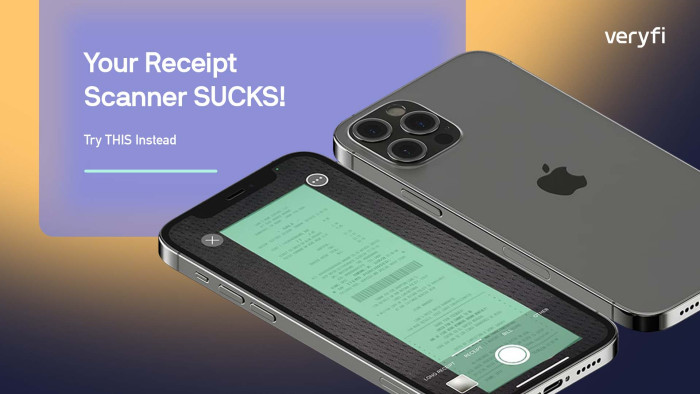





Capturing a receipt is easy. Capturing a valid receipt with the right vendor, date, and total that is clearly visible is where most user frustration begins.
That’s why we built On-Device Field Detection into the Veryfi Lens SDK. The capability runs on-device and validates key receipt fields while the user is still on the confirmation screen. No uploads, no server round trips, no waiting on OCR results. Users find out something’s wrong before they tap submit, not when a rejection email shows up later.
Jump to your section:
Product Manager? → Skip to Why This Matters
Developer? → Skip to Enable It with One Setting
Real-Time Receipt Validation
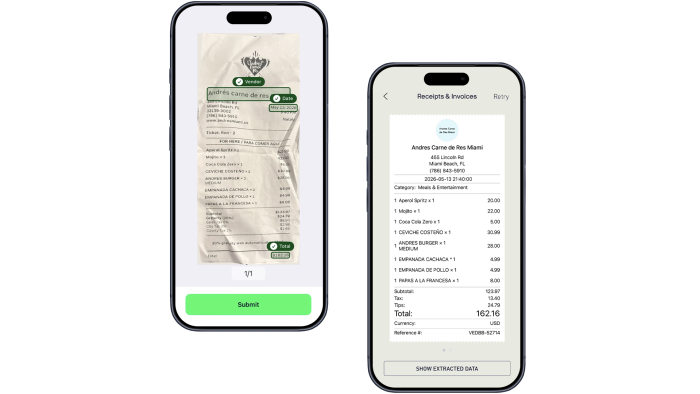
As soon as a receipt is captured, Lens analyzes it and extracts the fields that matter most: vendor, date, and total. On the confirmation screen, it can visually highlight what it found and flag anything missing or unreadable.
That’s a small UX shift with real downstream effects. Receipt approval rates go up. Loyalty campaign drop-off decreases. Expense reimbursement flows get cleaner. Your support queue shrinks. And because bad data gets caught before it ever enters your pipeline, there’s less room for fraud to slip through quietly.
Why This Matters
Most receipt capture workflows still work the same way: capture, upload, validate. The problems show up in batch: blurry receipts, cropped totals, missing dates, merchants the system can’t recognize. By the time someone flags the issue, the user is long gone.
Field detection moves that wall. Your app can show visual confirmation the moment something is found, warn users about missing fields before they submit, and optionally block incomplete submissions altogether. Everything runs offline, on the device, through a UI you can customize to match your brand.
On-Device Detection
Veryfi Lens runs detection locally using optimized mobile AI models. That means no connectivity dependency, faster feedback loops, and nothing leaving the device before the receipt is actually ready. For apps used in retail environments, airports, or anywhere signal is unreliable, that offline reliability matters more than most specs on a feature sheet.
The Feature in Action
When enabled, Lens scans the receipt preview and overlays indicators for each detected field. Users can see right there whether the store name was recognized, whether the date parsed, and whether the total is visible – before doing anything else. If something is missing, Lens surfaces it immediately.
It turns a passive upload flow into something closer to a guided experience, without adding friction.
Enable It with One Setting
settings.documentFieldsToDetect = ['vendor', 'date', 'total'];
Supported Fields
- vendor – Merchant or store name
- date – Transaction date
- total – Receipt total amount
Prevent Incomplete Submissions
settings.allowSubmittingDocumentWithoutFields = false
Fully Customizable UI
The detection overlays are fully configurable – pill corner radius, background and text colors, status icons, and light/dark theming to match your app.
settings.documentFieldsUICornerRadius = 20
settings.documentFieldsBackgroundColor = "#04581A"
settings.documentFieldsTextColor = "#FFFFFF"
Example Configuration
import VeryfiLens

let credentials = VeryfiLensCredentials(
 clientId: "<clientId>",
 username: "<username>",
 apiKey: "<apiKey>",
 url: "https://api.veryfi.com"
)

let settings = VeryfiLensReceiptsSettings()
settings.documentFieldsToDetect = ["vendor", "date", "total"]
settings.allowSubmittingDocumentWithoutFields = false

VeryfiLens.shared().configure(
 with: credentials,
 settings: settings,
 completion: { success in

 // Lens ready
 }
)
Designed for Real-World Receipt Flows
This feature works best in flows where an incomplete submission creates real downstream work: loyalty and rewards programs, expense management platforms, cashback campaigns, consumer promotions.
On-Device Field Detection moves validation from your backend to the moment of capture. Your data gets cleaner, users get faster feedback, and the gap between “receipt taken” and “receipt processed” shrinks and all running on-device. Check out this video to see Veryfi Lens On-Device Field Detection feature in action.