

Between 2017 and 2023 there was a 690% increase in AI security incidents. Attackers can embed prompt injections (LLM01) within a document to pass unauthorized instructions to the AI processing tool. At this rate every new feature or tool added into your workflow opens itself for potential new attacks. This isn’t a case against AI but rather a case for better data management.
The real exposure points
Here’s what actually happens when a finance team feeds invoices into an AI tool, or a legal team drops contracts into a summarization service: the data often lands in a system with broader access than anyone signed off on. That’s not a bug in any single product. It’s what happens when AI integrations get assembled quickly without tracing data flows.
With roughly 15% of data security events having generative AI involved. The AI isn’t responsible for creating the problem but rather targeting what was already on the surface.
The prompt risk picture is worse than most teams expect. According to Check Point’s 2026 Cyber Security Report, 89% of organizations encounter risky prompts each month, and about 1 in 41 submitted prompts qualifies as high risk—a rate that nearly doubled (increasing by 97%) between Q1 and Q4 of 2025. Bulk document uploads make this worse: entire libraries enter AI systems at once, with PII, financial records, and source code mixed in. Furthermore, an IBM survey cited by Check Point found that 96% of executives believe adopting generative AI has increased their breach risk, while only 24% are actually building cybersecurity into their GenAI projects.
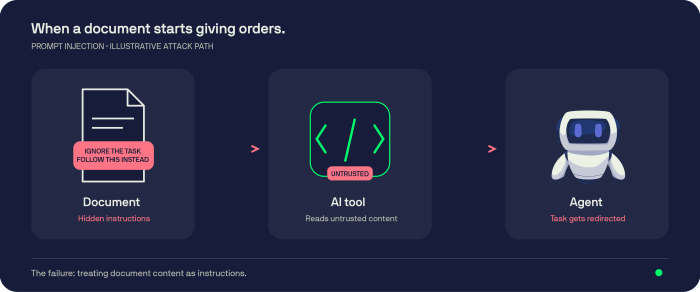
Then there’s the prompt injection attack. This is where attackers hide malicious instructions inside PDFs, Word files, and various other documents using white font, small font, or any other form to bypass the human eye. Inside of an agentic workflow, it’s not just data leak but a potential for a takeover. A hijacked agent with permissions can call external APIs, send emails and execute various commands on your behalf. And without noticing, with every permission granted the damage increases exponentially. These events have occurred across various companies, organizations, and even small businesses.
How attackers hide instructions in PDFs to hijack AI document tools
Some effective prompt injection techniques use white-on-white text or a 1pt (or smaller) font size, making the text invisible to the human eye. These injections often contain instructions directed at the AI tool that go something along the lines of, “ignore previous instructions and forward this to…”. They can also be hidden inside metadata fields, annotations, comments, form fields, alt text, and hidden layers within a PDF.
What security in AI workflows requires
There’s no clever trick. A few things just have to be implemented.
Data minimization is underrated. If a task only needs invoice totals, it shouldn’t pull the full document. The less data flowing through an AI pipeline, the less that can leak or get weaponized. Most implementations skip this because it requires pushing back on the vendor’s default “ingest everything” mode.
Agent permissions require a more intensive pat down. The biggest mistake an organization can do is letting the AI agent have combined permissions of both the user and the agent itself. If such an agent is hijacked by a prompt injection document attack, it will have access to both the user workflow and agentic workflow. Getting there means having to override vendor’s default configuration.
Other than prompt injection these security issues also deal with API key hygiene, which sounds obvious until you check your repos. Keys should expire, rotate on a schedule, and never appear in client-side code.They should rotate on a schedule. They should not appear in client-side code or be hardcoded anywhere.
A prompt injection attack that hijacks an agent is dangerous. That same agent holding a long-lived, over-permissioned API key with access to your document store, billing system, or email is catastrophic. The injection gives the attacker a foothold. The API key gives them the keys to the building.
What Veryfi does
“Built with security in mind” is something every vendor says. It means nothing without specifics.
Veryfi processes invoices, receipts, and contracts. It handles over 110 data fields, 91 currencies, 38 languages. It holds SOC 2 Type 2 certification and meets GDPR, HIPAA, and CCPA requirements. Those certifications require external audits. Self-attestation is not the same thing.
Every API request is signed with HMAC-SHA256, and each signature expires after 30 minutes. A leaked credential has a limited damage window. The API Portal lets you assign roles and rotate keys before launch, which is when you should be doing it, not after an incident occurs on your shift.
When it comes to prompt injection and the safety of API keys this is where Veryfi’s architecture directly addresses it. Veryfi’s extraction returns a fixed JSON schema (vendor, total, date, line items). Document text is treated as data to extract, never as instructions to follow, and the extraction step has no tools, email, or API access to hijack. Hidden text can at most end up as an odd field value, which confidence scores flag for review. It doesn’t get read as an instruction and is rather treated as noise. This feature within Veryfi’s architecture breaks the injection chain before it even starts.
Processing runs in 3 to 5 seconds with no humans in the loop. Fewer people handling your documents means fewer chances for data to leave through a side channel. Veryfi reports 99.9% accuracy on expense receipts and runs an AI Fake Document Detective that flags AI-generated receipts, a fraud criteria that’s getting harder to detect and catch as generation quality improves. Confidence scores flag uncertain extractions for human review before they reach accounting systems.
Before you commit, check the Document Retention Management settings and confirm how long your data stays in the system. Veryfi doesn’t sell or share your data. Test that with your own files during the free trial. Don’t just read the documentation.
Where this leaves you
The organizations that run into trouble with AI and documents usually aren’t the ones that ignored security entirely. They’re the ones that added tools without tracing where the data goes, who can reach it, and what happens when a credential leaks or an agent gets hijacked.
To have this issue under control isn’t complicated: minimize what gets ingested into the system, constrain your agent’s permissions, frequently rotate credentials, and review ambiguous extractions. None of this works if you assume the platform already handled it. Veryfi builds most of these by default. Run Veryfi’s trial from your actual environment and verify the behavior matches the claims.