Image Forensics: Detect Edited & Fake Images
Veryfi Image Forensics reads every layer inside a receipt photo, a proof of purchase, or a claim photo: pixels, error levels, camera noise, EXIF metadata, and file structure. It checks them against 110 fraud signals in under 3 seconds and returns a risk score, the evidence, and a plain-English explanation before the image enters your workflow.
Get Started for Free Free Demo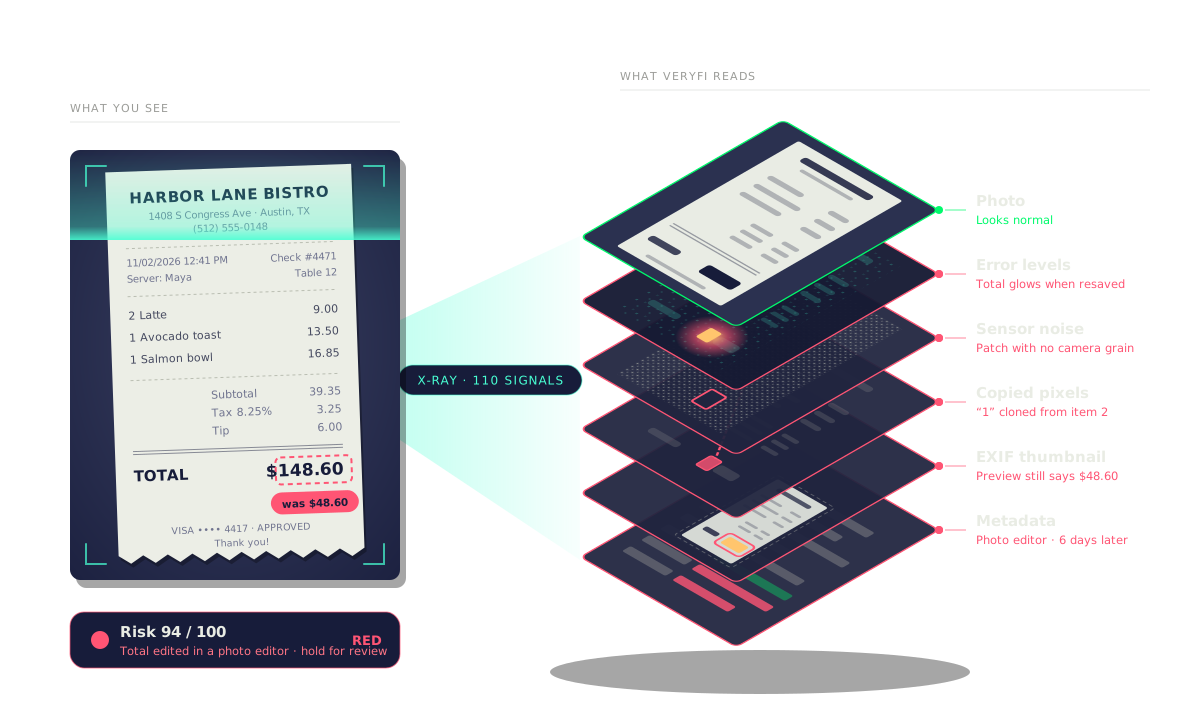
How Veryfi reads the layers inside a PNG image and uses multi-modal AI to detect fraud
A PNG photo of a receipt looks like one picture, but Veryfi reads it as eleven layers: the rendered image, the characters, error levels, sensor noise, copied pixels, JPEG compression history, the EXIF thumbnail, EXIF data, text chunks, and the file structure, and then a multi-modal AI model reads the pixels, text, and metadata together. In this example the total was changed from $48.60 to $148.60. The photo looks normal, but nine layers show the edit: a digit that sits off the printed baseline, a bright spot in error level analysis, a patch with no camera noise, pixels copied from another line, a break in the JPEG block grid, an EXIF thumbnail that still shows the original total, EXIF dates that disagree, text chunks written by a photo editor, and an AI model that scores the image 3% likely to be AI-generated but 97% likely to be edited at the total. The file itself is a valid PNG. Veryfi Fraud Detection reads every layer, not just the pixels, and uses AI to tell a generated image from an edited one.
The photo looks real. The layers say otherwise.
Veryfi Inspect X-Ray checks every receipt photo against 110 fraud signals
A photo of a receipt goes into Veryfi Inspect X-Ray and is read against 110 fraud signals in three families. File and origin (34 signals): 14 file signals, 8 metadata signals, and 12 timeline and duplicate signals. Pixels and AI (25 signals): 16 pixel signals and 9 AI-generated and screen recapture signals. Text and PDF (51 signals): 9 OCR signals, 26 PDF structure signals, and 16 PDF content signals. On top of these, 14 document integrity checks confirm the file is complete and consistent. Out come three results: the extracted data (merchant, date, items, tax, and total), the fraud signals that fired (a photo of a screen, pixel edits around the total, a camera date after the purchase date, and a possible duplicate of an earlier submission), and an insight (a risk score of 87 out of 100, so the receipt is held for review).
Vee, the Veryfi Inspect advisor, explains every fraud signal on a receipt photo and what to do next
Vee Advisor
Every signal, explained by Vee.
- Hi, I’m Vee. I read this receipt photo against all 110 Inspect X-Ray signals. Let me walk you through what fired, why it matters, and what to do next.
- Scan Signals: 94% risk. 9 of 110 signals fired across four families, and they all point at one field: the total. That’s high risk.
- Verdict: reject the expense as submitted. I’m confident: the pixels, the math, and the metadata agree. The rest of the receipt is real, so if you pay anything, pay the original $48.60.
- 1. Total edited. Someone pasted a “1” in front of $48.60. One digit adds $100 to the claim.
- Zoom in on the total. The “1” glows at error level 41 while the rest of the photo sits at 3 to 6. It has no camera grain, and it matches the “1” in item 2 at 97.9%.
- 2. Total doesn’t add up. Subtotal, tax, and tip come to $48.60. The printed total is $148.60, off by exactly $100.
- Here are the numbers. 39.35 + 3.25 + 6.00 = 48.60. Every line reads cleanly, so this is not an OCR slip.
- 3. Edited after capture. The camera saved this photo on Nov 2. An online photo editor saved it again on Nov 8.
- Here’s the date. The receipt and the camera both say 11/02 at 12:41. The file was saved again on 11/08 at 22:15, and the camera’s own preview still shows $48.60.
- Saved again 6 days later. The photo was taken at the restaurant on Nov 2, edited on Nov 8, and submitted the next day.
- Tax checks out, the total doesn’t. 8.25% of 39.35 is 3.25, so the original receipt was consistent. Only the total moved.
- Got questions? Chat with me. Ask anything about this receipt. I answer from its X-ray report, like whether the camera app could have done this.
- That’s every signal. 3 findings: 2 high, 1 medium. Reject it as submitted and ask Dana for the original photo or the card statement line.
Developer Friendly API (Headless Option)
Image fraud signals are baked into the same JSON response as your extracted data API. 1 API. No second API call. No extra integration. AI that reads every photo and knows when it’s been edited.
Most teams are up and running in an afternoon.
color is your routing logic.
attribution is your audit trail.
mages.is_lcd tells you the photo was taken of a screen.
Thresholds ship with sensible defaults. Tighten or loosen per signal whenever you’re ready.
Use Cases
Anywhere a photo is proof of money spent, damage done, or who someone is. See how Veryfi reads the layers inside a photo.
-
Employee Expense Reports
 Padded expense claims usually start with a real receipt photo and one changed number. Veryfi checks every receipt photo for edited totals, pasted digits, photos of a screen, AI-generated receipts, and receipts already claimed by someone else. The risk score and the edited fields come back with the extracted data, so clean claims auto-approve and only the suspicious ones reach a reviewer.
-
Rewards & Loyalty Programs
 Receipt-for-rewards apps attract the same receipt submitted from many accounts, screenshots of other people’s receipts, and generated receipts for products never bought. Veryfi flags duplicates across submissions, screen recaptures, and AI-generated images before points are issued. Programs keep sign-up friction low without paying out on fake purchases.
-
Insurance Claims
 Claims arrive with photos of receipts, repair estimates, and damaged property. Veryfi checks whether each photo was edited, taken from a screen, generated by AI, or already used in an earlier claim, and compares the camera date with the date of loss. Adjusters see the evidence for each flag instead of a bare score.
-
Returns, Refunds & Warranty
 Proof-of-purchase photos are easy to fake: change the date to fit the warranty window, change the store, or change the price. Veryfi reads the pixels and the camera metadata together, so an edited date or total shows up even when the photo looks clean. Approve real refunds instantly and route the rest to review.
-
FSA, HSA & Health Reimbursements
 Pharmacy and clinic receipts are submitted as phone photos, and an edited amount or a resubmitted receipt is hard to spot by eye. Veryfi flags edited fields, duplicates, and recaptured images on every submission, alongside the extracted provider, date, and amount, so administrators approve eligible claims faster.
-
Fleet & Driver Reimbursements
 Fuel, toll, and parking receipts are photographed on the road, often in bulk at the end of the week. Veryfi checks each photo for edited amounts and dates, the same receipt submitted twice, and capture times that do not match the trip. Fleet teams reimburse drivers quickly and only review the receipts that need it.
-
Digital Onboarding & KYC
 Onboarding flows take photos of IDs, utility bills, and other proof documents straight from the phone camera. Veryfi spots a photo of a screen, a pasted name or address, and an image made by an AI tool, so fraudulent sign-ups are caught at upload instead of after the account is open.
-
Benefits, Grants & Rebates
 Rebate and benefit programs pay out against receipt photos, which makes them a target for edited and recycled receipts. Veryfi checks each photo for tampering and duplicates across the whole program, with a plain-English reason for every flag that reviewers and auditors can follow.
Frequently Asked Questions for Image Forensics
-
What is image forensics?
It means checking the inside of a photo (pixels, compression history, camera noise, EXIF metadata, file structure) to find out whether it was changed after the camera took it, or never came from a camera at all. Looking at the photo can’t show this.
-
How is this different from OCR or a visual check?
OCR reads what the receipt says. Forensics checks whether what it says is original. An edited photo can look perfect and still carry a patch with no camera grain, a digit copied from another line, or a photo editor’s name in its metadata.
-
Which images does it work on?
Photos and scans of receipts, invoices, IDs, bills, and other documents in JPEG, PNG, and other common image formats, including screenshots.
-
Does it catch a photo of a screen?
Yes. Screen recapture has its own signals. A photo of a monitor or phone comes back flagged as an LCD photo, with `is_lcd` and a score in the JSON.
-
Can it tell an AI-generated image from an edited one?
Yes. The multi-modal model scores both separately, for example “3% AI-generated, 97% edited at the total.”
-
Which tools does it catch?
Photoshop and other photo editors, online photo editors, phone markup apps, receipt generator websites, and images made by ChatGPT or other AI image tools.
-
What if the EXIF data was removed?
Removing metadata is itself a signal, and the pixels (error levels, camera noise, copied regions, compression history) still carry traces of the edit.
-
Will it flag real photos just because they were compressed or sent through a messaging app?
Not on its own. One signal changes the score, but red needs several signals pointing to the same field. Yellow sends the image to a person for review.
-
Does it catch the same receipt submitted twice?
Yes. Each image is compared with earlier submissions, and matches come back in the “duplicates” list with a score and a link to the earlier one.
-
Do I have to set up rules or train a model?
No. It works on the first day, and you choose what green, yellow, and red do in your workflow.

Fraud is live 24×7
Intercept Document Fraud
Intercept forged IDs, padded expenses, and fake invoices flooding KYC/KYB, Travel & Expense, Bill Pay, Audit and other areas where fraud is a risk. Stand up Veryfi in minutes and shut them out before they clear.
No credit card required. Live in minutes.