PDF Forensics: Detect Edited & Fake PDFs
Veryfi PDF Forensics reads every layer inside a bank statement, pay stub, or invoice: text, fonts, metadata, digital signatures, and file structure. It checks them against 110 fraud signals in under 3 seconds and returns a risk score, the evidence, and a plain-English explanation before the document enters your workflow.
Get Started for Free Free Demo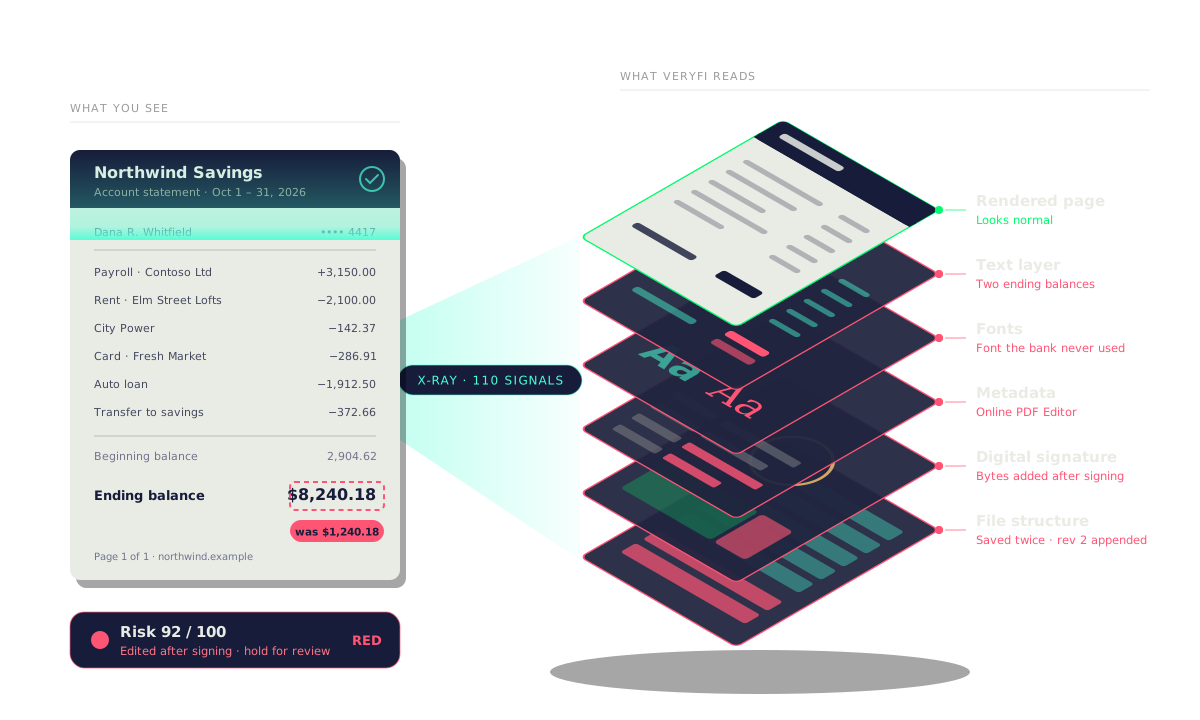
How Veryfi reads the layers inside a PDF and uses multi-modal AI to detect fraud
A PDF bank statement looks like one page, but Veryfi reads it as eleven layers: the rendered page, annotations, text objects, extracted text, fonts, images, a page thumbnail, metadata, a digital signature, and the file structure, and then a multi-modal AI model reads the pixels, text, and structure together. In this example the ending balance was edited. The page looks normal, but nine layers show the edit: a white annotation box over the old number, a new text object drawn on top, two balances in the extracted text, a font the bank never used, a thumbnail that still shows the original value, metadata from an online PDF editor, bytes added after the digital signature, an incremental update that leaves the original content stream in the file, and an AI model that scores the statement 2% likely to be AI-generated but 96% likely to be edited at the ending balance. Veryfi Fraud Detection reads every layer, not just the pixels, and uses AI to tell a generated document from an edited one.
The page looks real. The layers say otherwise.
Veryfi Inspect X-Ray checks every PDF against 110 fraud signals
A PDF goes into Veryfi Inspect X-Ray and is read against 110 fraud signals in three families. File and origin (34 signals): 14 file signals, 8 metadata signals, and 12 timeline and duplicate signals. Pixels and AI (25 signals): 16 pixel signals and 9 AI-generated and screen recapture signals. Text and PDF (51 signals): 9 OCR signals, 26 PDF structure signals, and 16 PDF content signals. On top of these, 14 document integrity checks confirm the file is complete and consistent. Out come three results: the extracted data (vendor, invoice number, date, and total), the fraud signals that fired (a text layer edited after signing, a font mismatch on the total, and metadata from an online editor), and an insight (a risk score of 92 out of 100, so the document is held for review).
Vee, the Veryfi Inspect advisor, explains every fraud signal on a document and what to do next
Vee Advisor
Every signal, explained by Vee.
- Hi, I’m Vee. I read this file against all 110 Inspect X-Ray signals. Let me walk you through what fired, why it matters, and what to do next.
- Scan Signals: 83% risk. 9 of 110 signals fired across six families, and they hit the fields that matter most. That’s high risk.
- Verdict: reject as proof of address. I’m confident on the call: the document type alone rules it out. Fax OCR is only 76%, so I flag details instead of guessing.
- 1. Wrong document type. This is a Plumbus Supply Co. credit memo plus a letter from Rick. Proof of address has to come from the issuer, like a utility bill or bank statement.
- The page types give it away. Page 1 reads as a credit note (92%) and page 2 as other (78%). Neither is the kind of document this workflow expects.
- 2. Address block size anomalies. Morty’s street line and city line are set at different sizes (CV 43%). The address is the field fraudsters edit most.
- Zoom in on the address. “137 Citadel Way, apt C-137” is smaller and sits off the city line’s baseline. Uneven size or spacing points to an edit. Uniform blur would just be fax noise.
- 3. Too old. The memo and Rick’s letter are both dated April 1, 2025. Yes, April Fools’ Day. Proof of address must be dated within the last 3 months.
- Here’s the date. April 1, 2025 is 19 months before this check ran. Even a perfect document this old would fail a KYC address check.
- Dates span 3.2 years. The fax header’s Thursday matches its date, so the dates are consistent, just stale. The newest one is 16 months outside the window.
- Arithmetic: not checkable. The line items add up to 4,206.90 schmeckles, but there’s no printed total to compare against. I can’t confirm the math or flag it.
- Got questions? Chat with me. Ask anything about this document. I answer from its X-ray report, like whether that address is really just fax noise.
- That’s every signal. 3 findings: 2 high, 1 medium. Reject it as proof of address and ask Morty for the issuer’s own PDF. Got more questions? Just ask me.
Developer Friendly API (Headless Option)
PDF fraud signals are baked into the same JSON response as your extracted data API. 1 API. No second API call. No extra integration. AI that reads documents and knows when they’re lying.
Most teams are up and running in an afternoon.
color is your routing logic.
attribution is your audit trail.
digital_tampering_fields pins exactly which values were touched.
Thresholds ship with sensible defaults. Tighten or loosen per signal whenever you’re ready.
Use Cases
Anywhere a PDF decides who gets a loan, an account, or a payment. See how Veryfi reads the layers inside a PDF.
-
Lending & Underwriting
 Loan, mortgage, and cash-advance decisions rest on bank statements and pay stubs that applicants upload as PDFs. An edited balance or deposit can look perfect on the page. Veryfi checks the text layer, fonts, metadata, signature, and revision history of every statement, and returns the edited fields with a risk score before the file reaches an underwriter.
-
KYC, KYB & Proof of Address
 Utility bills, bank statements, and incorporation documents prove who a customer or business is. Fraudsters edit the name or address, or build the whole file from a template. Veryfi flags text overlays, fonts the issuer never used, PDFs from online editors and template farms, and documents too old for the check, so onboarding teams only review the files that need it.
-
Accounts Payable & Vendor Invoices
 Invoice fraud often means a real vendor invoice with a changed amount or new bank details. Veryfi reads each invoice PDF for edits after it was created, a second text layer over the original numbers, and invoices already paid, and returns the fields that were touched with the extracted data. AP teams pay clean invoices automatically and hold the rest.
-
Tenant Screening
 Rental applications ask for pay stubs and bank statements to prove income, and edited PDFs are a common way around the rule. Veryfi checks each document for changed amounts, mismatched fonts, editor metadata, and saves after the issuer created the file, so property managers can approve good applicants quickly and question the rest.
-
Insurance Claims & Underwriting
 Claims arrive with PDF invoices, repair estimates, and medical bills, and policies are written on income and financial statements. Veryfi flags edited amounts, dates moved to fit the policy, and documents generated by AI, with the evidence for each flag, so adjusters and underwriters spend their time on the files that are actually suspicious.
-
Employment & Income Verification
 Verification services check pay stubs, W-2s, offer letters, and employer letters that candidates upload as PDFs. Veryfi spots an edited salary or employer name, a document built in a word processor instead of a payroll system, and a file generated by AI, and explains each finding in plain English for the verifier.
-
Government Benefits & Grants
 Benefit, relief, and grant programs decide eligibility from income statements, tax forms, and bank statements submitted as PDFs. Veryfi checks every file for edits and template-built documents at intake, with a reason for each flag that caseworkers and auditors can follow.
-
Audit & Forensic Accounting
 Auditors and investigators need to know whether a statement or invoice in the file is the one the issuer sent. Veryfi shows the PDF’s revision history, the bytes added after a digital signature, the tool that last saved the file, and the original values still left inside it, as evidence a reviewer can cite.
Frequently Asked Questions for PDF Forensics
-
What is PDF forensics?
It means checking the inside of a PDF (text objects, fonts, metadata, signatures, revision history) to find out whether the file was changed after the issuer created it. Looking only at the page can’t show this.
-
How is this different from OCR or a visual check?
OCR reads what the page says. Forensics checks whether what it says is original. An edited PDF can look perfect and still carry a second text layer, a new font, or an editor’s name in its metadata.
-
Which documents does it work on?
All types of documents that are of format type PDF.
-
Does it work on scanned PDFs, or only original digital ones?
All types. Those generated by industrial scanners during back-office digitization, created by humans using PDF creator like tools, those FAXed and more. As long as it’s a PDF we got you.
-
Can it tell an AI-generated PDF from an edited one?
Yes. The multi-modal model scores both separately, for example “2% AI-generated, 96% edited at the ending balance.”
-
Which tools it catches?
Online PDF editors, Acrobat “Edit text”, files exported from Word or Excel, template-farm documents, and PDFs generated by ChatGPT or other AI.
-
What happens if a PDF is digitally signed?
Veryfi checks which bytes the signature covers and flags anything added after signing.
-
Will it flag real documents just because they were re-saved or compressed?
Not on its own. One signal changes the score, but red needs several signals pointing to the same field. Yellow sends the file to a person for review.
-
Can fraudsters get around it by removing metadata?
Removing metadata is itself a signal, and the other layers (fonts, text objects, file structure, pixels) still carry traces.
-
Do I have to set up rules or train a model?
No. It works on the first day, and you choose what green, yellow, and red do in your workflow.

Fraud is live 24×7
Intercept Document Fraud
Intercept forged IDs, padded expenses, and fake invoices flooding KYC/KYB, Travel & Expense, Bill Pay, Audit and other areas where fraud is a risk. Stand up Veryfi in minutes and shut them out before they clear.
No credit card required. Live in minutes.