





The Veryfi Lens is a way for you to Collect documents in a secure manner, backed by real-time machine extraction.
Every submission using Veryfi Lens sends the document to Veryfi API in the cloud for extraction and labelling of data in real-time. The photo you took is now in the cloud. However, if you want an additional copy stored on your device then you can enable this feature inside the Lens Menu as follow.
- Start Veryfi app and press the COLLECT button to start Veryfi Lens. Veryfi’s custom camera starts.
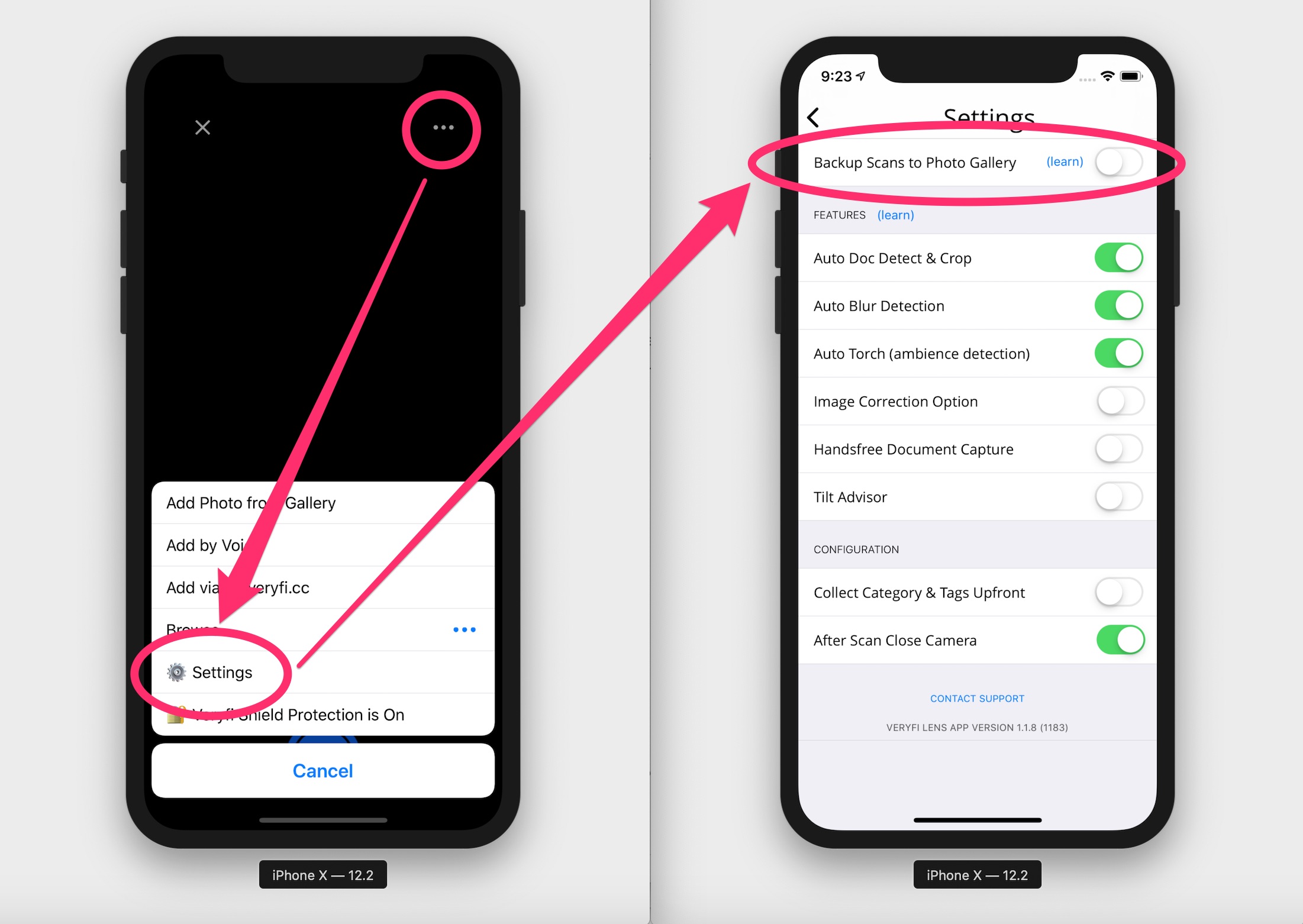
- Press the Veryfi Lens Menu icon (ellipsis / … / 3 dots) in the top far right corner to open the Veryfi Lens Menu.
- In the Veryfi Lens Menu, press SETTINGS.
- In the SETTINGS view enable “Backup Scans to Photo Gallery”.
- Done. Now all your scans will be backed up to your camera’s photo gallery.
Veryfi Lens FAQ
- Veryfi Lens Explained
- Get Veryfi Lens for your App
- Veryfi Lens Permissions to avoid a blank canvas
- How to take multiple photos one after the one
- How to correct distorted images