





Cloning a document like receipt is an alternative method to bill splitting. This means you can use this approach for double entry accounting debiting/crediting each account for each line item (cloned document) while maintaining a single ledger vs the traditional bill splits which use sub-ledgers.
How to clone a receipt
- Head over to https://hub.veryfi.com/documents/
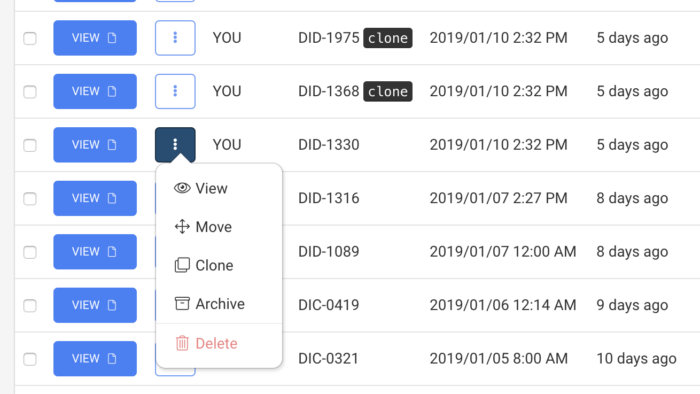
- Find the document you want to clone and press “More” button as shown below to reveal available actions for that document.
- Press “Clone”. That’s it.
How to identify clones
Each cloned document is identified as a clone in the documents list view (show above in the Document ID column) and also inside the document modal (shown below).
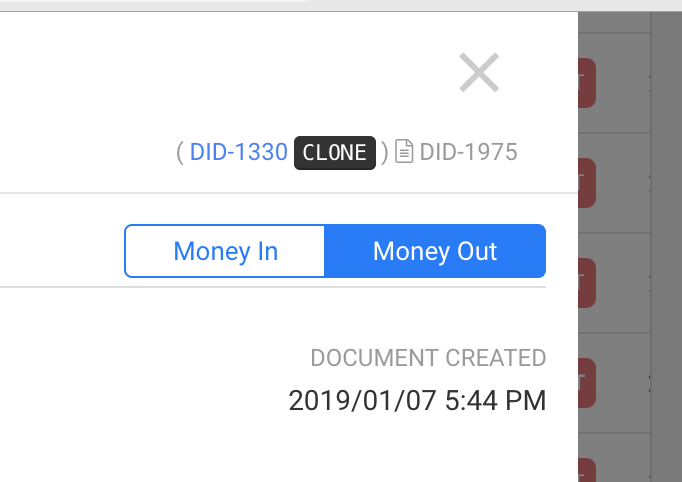
Note that you can also click the blue link (show above as DID-1330) which will take you to the original document that one is cloned from.
Why clone?
- Allocate debit / credit across multiple entities (multiple business profiles) to simplify double-entry accounting.
- Move your cloned transactions between profiles or teams while retaining a copy of the original.
- Far simpler than traditional bill-splits which use sub-ledgers to track the splits. Cloning method retains the splits in the main ledger. No need for sub-ledger reporting complications.
Want more of this? Let us know. Email [email protected] with your feedback.