Receipt OCR API

Stop manually keying in receipt data. Veryfi's API extracts every line item, tax, tip, and vendor detail into trusted JSON — any format, language, or currency — in seconds.

Get Started for Free Free Demo
Receipt OCR API

POST /api/v8/partner/documents · Live

Receipt in. JSON out.

Veryfi’s Receipt OCR API reads a receipt and returns the merchant, line items, tax, card, and total as JSON via POST /api/v8/partner/documents. Expense, card, and bookkeeping workflows use that payload instead of keying each tape by hand. See supported receipt fields and the Process a Document docs.

0 fields snapping into JSON

What is a receipt?

A receipt is proof the money already moved. It names the merchant, the date, the line items, the tax, the card, and the total paid.

Expense tools and bookkeepers need those same lines as structured data. The API above returns that tape as JSON.

Did you know

A receipt has no ink. The letters are a chemical coating that turns black when the printer heats the paper, which is why a hot coffee cup can black the whole tape out.

Veryfi Lens

Test Drive It on your Phone

Mobile Receipt Capture SDK

Replace your phone’s camera with AI powered Lens by Veryfi to capture documents on the move, in any lighting conditions and even offline.

Free demo app for iPhone and Android. Scan the code or tap a store.

  • On-device extraction
  • Offline capture
  • Document AI detection
  • Burst mode for high-volume capture
  • Blur & not-document detection

Unlock a Wealth of Data from Receipts

What is Receipts OCR API?
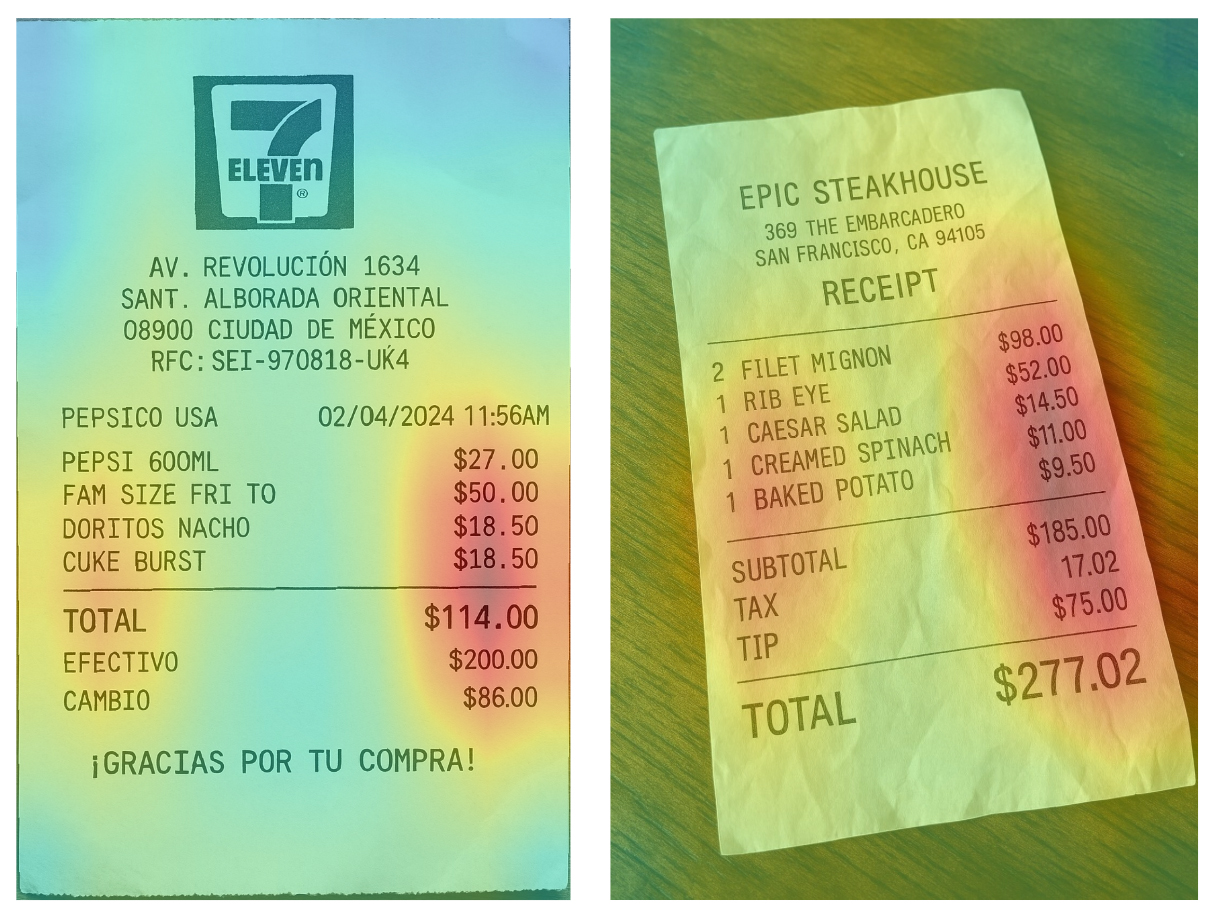
Receipts OCR API is an API (Application Programming Interface) that turns your receipts into data in seconds using AI. You can send receipts to the API in any format (pdf, image, etc) and receive the response in a structured (key/value) JSON irrespective of receipt structure, geography or language. Veryfi’s AI runs proprietary foundational models trained on hundreds of millions of receipts so it can understand all possible data (see supported fields) on these receipts and even those pesky taxes and handwriting in various geographies.

What is Receipts OCR?
Receipt OCR (optical character recognition or optical character reader) is the electronic or mechanical conversion of receipt images, receipt paper, and handwritten or printed text into machine-encoded text using software. This work traditionally required manual human labor but that was inefficient and ripe for mistakes. Veryfi Receipts OCR API will also return the OCR text in every JSON response for you to further customize the application of this data in your application for various purposes like automating expense management, validating loyalty programs and more.

Let’s Veryfi It

Interactive sample for service illustration. Test drive Veryfi — 14-day free trial, or speak to a Veryfi Expert.

Whole Foods Market
Store #10418 · San Mateo
210 S B St, San Mateo, CA 94401
(650) 358-9600
– SALE –
SALE #: S1785US005821TRANS#: 18854480
03-28-2023

STORE #1814
REG #01
CASHIERMARIA
TRANS #5821
DATE: 03/28/2023  TIME: 1:10 PM
28 Mar 2023 · 1:10 PM Trans #5821
Reg 3 · Cashier 19 Acct ••0053

ORGANIC BANANASPLU 4011 · 1.12 lb 1.89
365 LARGE EGGS 12CTSKU 365-EGG-12 5.49
HASS AVOCADO BAGSKU 365-AVO-4 4.99
SPARKLING WATER 8PKUPC 09948245427 6.44
RED BULL ENRGY DRNK CNS 8.4OZ 6PKUPC 61126999100 18.79

SUBTOTAL37.60
TAX1.93
TOTAL39.53
MASTERCARD39.53
CARD #************8232
CHIP READAUTH 9470OZ
AIDA0000000041010
PAYMENTMASTERCARD
CARD #****8232
AMOUNT$39.53
DEBIT**** **** **** 8232
APPROVAL9470OZ
REF #392256674399
INVOICE 18934 TOTAL: 39.53
MASTERCARD:39.53
MASTERCARD ****8232 AUTHCODE 9470OZ
STORE: 1785 TERMINAL: 18 03/28/2023 1:10 PM
# OF ITEMS PURCHASED = 5
EXCLUDES FEES, SERVICES AND
SPECIAL ORDER ITEMS
THANK YOU FOR SHOPPING WITH US
08839668024792288
RETURN POLICY: 90 DAYS WITH RECEIPT
Doers Get More Done.
Tell us about your visit!
homedepot.com/survey

THANK YOU FOR SHOPPING WITH US.

FOR DETAILS ON OUR RETURN POLICY,
VISIT [ LOWES.COM/RETURNS ]

A WRITTEN COPY OF THE RETURN POLICY
IS AVAILABLE AT OUR CUSTOMER SERVICE DESK

STORE MANAGER: JANE ORTIZ

[ LOWE’S PRICE PROMISE ]
FOR MORE DETAILS, VISIT
LOWES.COM/PRICEPROMISE
Whole Foods Market
Store #10418 · San Mateo
210 S B St, San Mateo, CA 94401
(650) 358-9600
– SALE –
SALE #: S1785US005821TRANS#: 18854480
03-28-2023

STORE #1814
REG #01
CASHIERMARIA
TRANS #5821
DATE: 03/28/2023  TIME: 1:10 PM
28 Mar 2023 · 1:10 PM Trans #5821
Reg 3 · Cashier 19 Acct ••0053

ORGANIC BANANASPLU 4011 · 1.12 lb 1.89
365 LARGE EGGS 12CTSKU 365-EGG-12 5.49
HASS AVOCADO BAGSKU 365-AVO-4 4.99
SPARKLING WATER 8PKUPC 09948245427 6.44
RED BULL ENRGY DRNK CNS 8.4OZ 6PKUPC 61126999100 8.79

SUBTOTAL27.60
TAX1.93
TOTAL29.53
MASTERCARD29.53
CARD #************8232
CHIP READAUTH 9470OZ
AIDA0000000041010
PAYMENTMASTERCARD
CARD #****8232
AMOUNT$29.53
DEBIT**** **** **** 8232
APPROVAL9470OZ
REF #392256674399
INVOICE 18934 TOTAL: 29.53
MASTERCARD:29.53
MASTERCARD ****8232 AUTHCODE 9470OZ
STORE: 1785 TERMINAL: 18 03/28/2023 1:10 PM
# OF ITEMS PURCHASED = 5
EXCLUDES FEES, SERVICES AND
SPECIAL ORDER ITEMS
THANK YOU FOR SHOPPING WITH US
08839668024792288
RETURN POLICY: 90 DAYS WITH RECEIPT
Doers Get More Done.
Tell us about your visit!
homedepot.com/survey

THANK YOU FOR SHOPPING WITH US.

FOR DETAILS ON OUR RETURN POLICY,
VISIT [ LOWES.COM/RETURNS ]

A WRITTEN COPY OF THE RETURN POLICY
IS AVAILABLE AT OUR CUSTOMER SERVICE DESK

STORE MANAGER: JANE ORTIZ

[ LOWE’S PRICE PROMISE ]
FOR MORE DETAILS, VISIT
LOWES.COM/PRICEPROMISE
Request: Receipt Data Extraction
import requests
url = "https://api.veryfi.com/api/v8/partner/documents"
headers = {
'CLIENT-ID': '<API_KEY_VALUE>',
'AUTHORIZATION': 'apikey <USERNAME_VALUE>:<API_KEY_VALUE>'
}
payload = {'file_url': 'https://cdn...'}
response = requests.post(url, headers=headers, data=payload)
print(response.json())
Response: Structured JSON
{
"account_number": "0053",
"accounting_entry_type": "debit",
"currency_code": "USD",
"date": "2023-03-28 13:10:00",
"line_items": [{
"description": "RED BULL ENRGY DRNK CNS 8.4OZ 6PK",
"price": 9.99,
"quantity": 1,
"total": 8.79
}],
"subtotal": 27.60,
"tax": 1.93,
"total": 29.53
}
Support for over 150 fields 🤟

Developer Friendly API

The only API you will ever need to accurately extract key/value data in a standardized format you can trust across any geography, language, or format — enabling seamless international business expansion without lifting a finger.

Day-1 Ready Pre-Trained Receipts AI Model
SDKs & code samples in Python, Node.js, PHP, C#, Java, Go and more
Detailed API Docs + FAQs that make sense
Human support from experts at HQ in Silicon Valley

No bullshit. No months of training. No "contact sales" gatekeeping. Start impressing your customers today.

Fight Receipt Fraud
"meta": {
"duplicates": [
{
"id": 191347946,
"score": 1,
"url": "https://scdn.veryfi.com/receipts/…"
}
],
"fraud": {
"attribution": "High velocity, Handwritten characters, LCD photo, Digital background, Duplicate receipt",
"color": "red",
"decision": "Fraud",
"digital_tampering_fields": [
"total",
"line_items.10.total",
"line_items.14.total"
],
"fraudulent_pdf": {
"font_mismatch": 0,
"fraudulent_pdf_creator": 0,
"score": 0.94,
"text_overlay": 0.94
}
}
...

Crush Fraud Before It Happens

54% of organizations never recover fraud losses. When the damage is done, recovery is unlikely. Catch it upfront!

STOP the 5% revenue drain from devastating your expense operations – with 65% of employees submitting questionable receipts and loyalty program fraud surging 89%, Veryfis Receipt Fraud Prevention obliterates altered receipts, intercepts fake expense claims, and eliminates duplicate receipt uploads before they steal thousands from your bottom line.

Deploy Veryfis Receipt Fraud Prevention and transform your vulnerable expenses into an impenetrable AI-powered fortress that validates every receipt, accelerates legitimate reimbursements, and preserves program integrity.

Multi-Modal AI

Not just OCR. Veryfi is a multi-modal powerhouse accessible via a simple to use API. Here is a short list of some of our models that work on your terms to delight your customers.

Multi-Modal Powerhouse
  • Stage 1: Image Intelligence

    ○ Blur Detection
    ○ Image Quality Analysis
    ○ Document/Non-Document Classification
    ○ Auto De-skewing
    ○ Smart Cropping
    ○ Linearization
    ○ Product Image Detection

  • Stage 2: Content Detection

    ○ Logo Detection
    ○ Logo Classification
    ○ Barcode/QR Detection
    ○ Barcode Transcription
    ○ Bleed-through Removal
    ○ Map Detection

  • Stage 3: Advanced Text Processing

    ○ Multi-Language OCR
    ○ Handwriting Detection
    ○ Handwriting OCR
    ○ Text Confidence Scoring
    ○ Character Enhancement

  • Stage 4: Document Intelligence

    ○ Data Extraction Engine
    ○ Document Classification
    ○ Product Intelligence
    ○ Line Item Analysis
    ○ Tax Calculation
    ○ Currency Detection

  • Stage 5: Fraud & Quality Assurance

    ○ AI-Generated Image Detection
    ○ LCD Screen Detection
    ○ Screenshot Detection
    ○ Digital Tampering Analysis
    ○ Velocity Fraud Check
    ○ PDF Layer Analysis
    ○ Duplicate Detection

  • Stage 6: YOU WINNING

    ○ Happy Customers
    ○ Faster Time to Market
    ○ Reduced Development Costs
    ○ Enterprise-Grade Accuracy
    ○ Global Scalability
    ○ Zero Maintenance
    ○ Competitive Advantage

Supported Fields

Store receipts extracted as JSON from POST /api/v8/partner/documents, including the merchant, line items, tax, and payment.

  • Vendor/Merchant
    • Name
      vendor.name
      The merchant name is the store or restaurant that took the payment. Expense tools match this string to a vendor record.What it is
      • The cleaned business name, not the all-caps line as printed
      • Who the receipt says was paid
      Where to find it
      • At the top of the tape, usually above the address
      • On the Whole Foods sample: Whole Foods Market
      Read it with
      • Raw Name, the printed line before cleanup
      • Store Number, when several locations share the brand
      Whole Foods Market
    • Raw Name
      vendor.raw_name
      Raw name is the merchant line as the OCR read it, before Veryfi normalizes spelling and case.What it is
      • Keeps the printed capitalization and punctuation
      • Useful when the cleaned name and the tape disagree
      Where to find it
      • The first merchant line on the receipt
      • On the Whole Foods sample: WHOLE FOODS MARKET
      Read it with
      • Name, the normalized merchant
      • Logo name, the brand key used to match a logo
      WHOLE FOODS MARKET
    • Address
      vendor.address
      The vendor address is the store location printed on the receipt. It separates two branches of the same chain.What it is
      • Street, city, region, and postal code as one string
      • The place of sale, not the cardholder's home address
      Where to find it
      • Under the merchant name
      • On the Whole Foods sample: 210 S B St, San Mateo, CA 94401
      Read it with
      • Raw Address, the line before parsing
      • Latitude and Longitude, filled from that address
      210 S B St, San Mateo, CA 94401
    • Raw Address
      vendor.raw_address
      Raw address is the location line as printed, before it is parsed into street, city, and postcode.What it is
      • Preserves the tape's own line breaks and case
      • The source string behind vendor.address
      Where to find it
      • Directly under the store name
      • On this sample the printed line is the all-caps form of the San Mateo address
      Read it with
      • Address, the cleaned location
      210 S B ST, SAN MATEO, CA 94401
    • Logo
      vendor.logo
      Logo is a URL for the merchant mark Veryfi matched to the receipt. It is not text read off the tape.What it is
      • An image URL for the brand
      • Filled when the receipt layout matches a known merchant
      Where it lives
      • Not a line of text on the receipt
      • The Whole Foods sample matches the Whole Foods Market logo
      Read it with
      • Logo name, the brand key for that image
      • Name, the words on the tape
      https://cdn.veryfi.com/.../logo.png
    • Phone
      vendor.phone_number
      The store phone number printed on the receipt. Support and location matching both use it.What it is
      • The merchant's phone, not the cardholder's
      • Kept as printed, including punctuation
      Where to find it
      • In the header or footer of the tape
      • On the Whole Foods sample: (650) 358-9600
      Read it with
      • Address, to confirm which store
      (650) 358-9600
    • Latitude
      vendor.lat
      Latitude is the store's north-south coordinate. Veryfi fills it from the address, not from a GPS line on the tape.What it is
      • A decimal degree for the merchant location
      • Paired with longitude
      Where it lives
      • Not printed on the receipt
      • Whole Foods San Mateo resolves to 37.56630
      Read it with
      • Longitude
      • Address
      37.56630
    • Longitude
      vendor.lng
      Longitude is the store's east-west coordinate, enriched from the vendor address.What it is
      • A decimal degree. West of Greenwich is negative
      • Paired with latitude
      Where it lives
      • Not printed on the receipt
      • The San Mateo store resolves to -122.32390
      Read it with
      • Latitude
      • Address
      -122.32390
    • Website Url
      vendor.web
      The merchant website printed on the receipt, or the site Veryfi associates with that vendor.What it is
      • A URL, not the store's street address
      • Used to confirm the brand
      Where to find it
      • Footer of the tape when the store prints it
      • The Whole Foods sample uses wholefoodsmarket.com
      Read it with
      • Name
      https://www.wholefoodsmarket.com
    • Logo
      vendor.logo_name
      This second logo value is the brand key Veryfi matched, not the image file. The response calls it logo name.What it is
      • A short slug such as wholefoodsmarket
      • How the logo image was chosen
      Where it lives
      • Not printed as a word on the tape
      • The Whole Foods sample key is wholefoodsmarket
      Read it with
      • Logo, the image URL for that key
      • Name, the words on the receipt
      wholefoodsmarket
    • Vendor Category
      vendor.type
      Vendor category is the merchant type Veryfi assigns, such as grocery, restaurant, or fuel. The current key is vendor.type. vendor.category is the deprecated alias and still matches this sample.What it is
      • A classification of the seller, not of one product
      • On this sample: Grocery Stores
      Where it lives
      • Not a heading the cashier types
      • Derived from the merchant and the items
      Read it with
      • Category under Meta, the expense category for the whole document
      • Type on a line item, such as food
      Grocery Stores
    • Store Number Name (enriched)
      vendor.store_number
      Store number is the branch id Veryfi pulls out of the header. On this receipt the line reads Store #10418.What it is
      • The location number, not the street address
      • Enriched from text such as Store #10418
      Where to find it
      • Header, next to the city
      • Whole Foods sample: 10418 in San Mateo
      Read it with
      • Address
      • Name
      10418
    • Learn more …
  • Dates
    • Invoice Date
      date
      On a receipt this is the sale date and time. The same key is the invoice date when the document is an invoice.What it is
      • ISO 8601 date and time
      • The moment of the transaction, not when Veryfi processed the file
      Where to find it
      • Near the top or bottom of the tape
      • Whole Foods sample: 2023-03-28 13:10:00
      Read it with
      • Created Date, the processing timestamp
      2023-03-28 13:10:00
    • Created Date
      created_date
      Created date is when Veryfi stored the document. It is not printed on the receipt.What it is
      • A processing timestamp
      • Set once, when the document is first saved
      Where it lives
      • Only in the API response
      • The example is a few seconds after the Whole Foods sale time
      Read it with
      • Updated Date
      • Invoice Date
      2023-03-28 13:10:08
    • Updated Date
      updated_date
      Updated date is the last time the stored document changed. It is not printed on the receipt.What it is
      • A processing timestamp
      • Moves when the document is edited or reprocessed
      Where it lives
      • Only in the API response
      Read it with
      • Created Date
      • Invoice Date
      2023-03-28 13:10:12
    • Learn more …
  • Line-Items
    • Date
      line_items[].date
      A line-item date is the date printed on that row, when the row is not the same moment as the receipt header.What it is
      • ISO 8601 date on one line object
      • Common on hotel folios and multi-day invoices
      Where to find it
      • At the start of the line
      • The Whole Foods product rows do not print a per-line date
      Read it with
      • Invoice Date, the document date
      • Description
      2023-03-28
    • SKU (Stock keeping unit)
      line_items[].sku
      SKU is the seller's own item code for that line. On the Whole Foods sample the banana row carries a PLU.What it is
      • The merchant's stock code, not a global barcode
      • Returned on each line item
      Where to find it
      • On the item row, often next to the description
      • Bananas: PLU 4011 · 1.12 lb
      Read it with
      • UPC, a global product code
      • Description
      PLU 4011 · 1.12 lb
    • UPC (Universal Product Code)
      line_items[].upc
      UPC is the barcode number for the product. The same field also holds an EAN or GTIN when that is what the line prints.What it is
      • A global item code
      • On this receipt the sparkling water line prints UPC 09948245427
      Where to find it
      • On the item row or under the description
      Read it with
      • SKU
      • EAN under Barcodes, which is a code drawn on the page rather than a line-item number
      09948245427
    • Category
      line_items[].category
      Line category is the product class for that row, such as Produce or Beverages. It can be enriched when line-item expansion is on.What it is
      • A classification of the item, not the whole receipt
      • Can be a list of category names
      Where it lives
      • Not always printed. Veryfi can assign it from the description
      • Bananas map to Produce
      Read it with
      • Section, a heading printed on the tape
      • Vendor Category, the type of store
      Produce
    • Section
      line_items[].section
      Section is the heading on the receipt that groups this line, such as Produce, Deli, or Grocery.What it is
      • The printed department, not a predicted category
      • Shared by every line under that heading
      Where to find it
      • A heading above a block of items
      Read it with
      • Category
      • Description
      Produce
    • Description
      line_items[].description
      Description is the item name with the date and the price stripped off.What it is
      • The product or service words
      • One value per line
      Where to find it
      • The text of the row
      • First Whole Foods line: ORGANIC BANANAS
      Read it with
      • Full Description
      • Total
      ORGANIC BANANAS
    • Full Description
      line_items[].full_description
      Full description keeps the extra text on the row, including weight, dates, and codes that the short description drops.What it is
      • The longer item text
      • Still excludes the price column when that is separate
      Where to find it
      • The same row as Description
      • Bananas plus the PLU and weight
      Read it with
      • Description
      • Normalized Description
      ORGANIC BANANAS PLU 4011 1.12 lb
    • Normalized Description
      line_items[].normalized_description
      Normalized description expands abbreviations and smooths the item name so matching does not depend on the tape's shorthand.What it is
      • A cleaned form of the item name
      • Not a second product
      Where it lives
      • Derived from the printed description
      • ORGANIC BANANAS becomes Organic bananas
      Read it with
      • Description
      • Product Info
      Organic bananas
    • Quantity
      line_items[].quantity
      Quantity is how many of that item the line charges for. Every Whole Foods sample line has quantity 1.What it is
      • A count, or a weight when the line is sold by the pound and quantity is 1
      • On the line object
      Where to find it
      • The qty column
      Read it with
      • Unit of Measure
      • Price
      • Total
      1
    • Reference
      line_items[].reference
      Reference is an extra code on the line that is not the SKU, such as a PLU or a work-order id.What it is
      • A line-level reference
      • Separate from the document reference number
      Where to find it
      • On the item row
      • Bananas: PLU 4011
      Read it with
      • SKU
      • Reference Number under Identifiers
      PLU 4011
    • Unit of Measure
      line_items[].unit_of_measure
      Unit of measure is how the quantity is counted: each, lb, kg, hour.What it is
      • The unit next to the quantity
      • On weighed produce this is often lb or kg
      Where to find it
      • Beside the quantity or inside the description
      • Bananas are weighed in lb
      Read it with
      • Quantity
      • Weight
      lb
    • Price
      line_items[].price
      Price is the unit price for the line. On the first Whole Foods row the extended total is also 1.89 because quantity is 1.What it is
      • Price per unit, before the line is extended
      • A number, in the document currency
      Where to find it
      • The price column on that row
      Read it with
      • Quantity
      • Total
      1.89
    • Tax
      line_items[].tax
      Line tax is the tax amount on that row when the receipt breaks tax out per item. Many US tapes only print tax once at the bottom.What it is
      • Tax for this line, not the receipt tax
      • 0 when the line is not taxed on its own
      Where to find it
      • A tax column on the row, when the layout has one
      • The Whole Foods sample puts 1.93 of tax in the totals, not on each line
      Read it with
      • Tax under Financials
      • Tax Rate
      0
    • Tax Rate
      line_items[].tax_rate
      Line tax rate is the percentage applied to that row.What it is
      • A percent, not a currency amount
      • 0 when the line does not carry its own rate
      Where to find it
      • Next to the line tax, or implied by a tax code
      • The sample receipt's sales tax rate is on the tax line, 5.133, not on each product
      Read it with
      • Tax Lines Breakdown
      • Tax
      0
    • Tax Code
      line_items[].tax_code
      Tax code is the short label for which tax rule hit the line, such as A for standard rated or Z for zero rated.What it is
      • A code, not the tax amount
      • Lets a ledger post the line to the right tax account
      Where to find it
      • A small letter or code at the end of the row
      • The grocery sample does not print per-line codes. A is a typical standard-rated mark
      Read it with
      • Tax Rate
      • Tax name in the tax breakdown
      A
    • Discount
      line_items[].discount
      Line discount is the amount taken off that row. The Whole Foods sample lines are undiscounted, so the value is 0.What it is
      • A currency amount for this line
      • Separate from a receipt-level discount
      Where to find it
      • On the row, often as a negative or a savings line
      Read it with
      • Discount under Financials
      • Discount Rate
      0
    • Discount Rate
      line_items[].discount_rate
      Discount rate is the percentage taken off the line.What it is
      • A percent
      • 0 when the row is not discounted
      Where to find it
      • On the row or in a promo note under it
      Read it with
      • Discount
      • Discount Price
      0
    • Discount Price
      line_items[].discount_price
      Discount price is the unit price after the line discount. With no discount it matches the price. The first sample line stays 1.89.What it is
      • The lower price after a line discount
      • Null when the document does not print a discounted price
      Where to find it
      • The sale price column, when there is one
      Read it with
      • Price
      • Discount
      1.89
    • Total
      line_items[].total
      Line total is the extended amount for that row. The five Whole Foods lines total 1.89, 5.49, 4.99, 6.44, and 18.79.What it is
      • Quantity times price, after that line's discount
      • The first line is 1.89
      Where to find it
      • The rightmost amount on the row
      Read it with
      • Subtotal, the sum of the lines
      • Price
      1.89
    • Subtotal
      line_items[].subtotal
      Line subtotal is the row amount before tax is added on that line. On a simple grocery row it matches the line total.What it is
      • The pre-tax amount for this item
      • Not the receipt subtotal
      Where to find it
      • On the row, when the layout splits pre-tax and tax
      Read it with
      • Total
      • Subtotal under Financials, which is the whole receipt
      1.89
    • Gross Total
      line_items[].gross_total
      Gross total is the line amount before deductions. On an undiscounted grocery row it matches the line total.What it is
      • The line before discounts
      • A number on that line object
      Where to find it
      • Used when the row prints both a gross and a net figure
      • The banana line has no deduction, so gross is 1.89
      Read it with
      • Net Total
      • Discount
      1.89
    • Net Total
      line_items[].net_total
      Net total is the line amount after deductions.What it is
      • The line after discounts
      • What most ledgers post for the item
      Where to find it
      • The net column, when the invoice prints one
      • 1.89 on the first sample line
      Read it with
      • Gross Total
      • Total
      1.89
    • Type (food, product, alcohol,..)
      line_items[].type
      Type is Veryfi's class for the line: food, product, alcohol, fuel, fee, discount, and others.What it is
      • A predicted label, not a word the cashier typed
      • Bananas are food
      Where it lives
      • Not printed as its own column
      • Allowed values include food, product, alcohol, tobacco, fuel, fee, and discount
      Read it with
      • Category
      • Description
      food
    • Weight (eg. kg/lb)
      line_items[].weight
      Weight is the measured weight on that line. The banana row on the sample is 1.12 lb.What it is
      • A weight with its unit when the tape prints one
      • Common on produce and freight lines
      Where to find it
      • Inside the item text or a weight column
      Read it with
      • Unit of Measure
      1.12 lb
    • Product Info (Brand, Category, Expanded Description)
      line_items[].product_info
      Product info is the enrichment object on a line: brand, category, and expanded description. It is returned when line-item expansion is enabled.What it is
      • brand, category, and expanded_description live on line_items[].product_info
      • Extra product detail beyond the printed row
      Where it lives
      • Not a column on the tape
      • The banana line enriches to the Produce category
      Read it with
      • Normalized Description
      • Category
      Produce
    • Learn more …
  • Financials
    • Subtotal
      subtotal
      Subtotal is the sum of the lines before tax, tip, and other adjustments. The Whole Foods sample subtotal is 37.60.What it is
      • Pre-tax merchandise total
      • A document-level amount
      Where to find it
      • Above the tax line
      Read it with
      • Tax
      • Total
      37.60
    • Discount
      discount
      Discount is the amount taken off the whole receipt, as opposed to a discount on one line. This sample has none.What it is
      • A document-level reduction
      • 0 when nothing was taken off the total
      Where to find it
      • A savings or discount line above the total
      Read it with
      • Discount on a line item
      • Subtotal
      0
    • Cashback
      cashback
      Cashback is cash the shopper took at the register on top of the purchase. It appears on some receipts and not on invoices.What it is
      • Money handed back, not a price reduction
      • The Whole Foods sample has no cashback
      Where to find it
      • Near the payment block, labeled Cash back
      Read it with
      • Total
      • Payment Method
      0.00
    • Tax (VAT, GST)
      tax
      Tax is the total tax on the document. On the Whole Foods sample that is 1.93 of California sales tax. VAT and GST use the same key.What it is
      • One number for all tax on the receipt
      • The breakdown, when printed, is in tax lines
      Where to find it
      • Between subtotal and total
      • Whole Foods sample: 1.93
      Read it with
      • Tax Lines Breakdown
      • Subtotal
      • Total
      1.93
    • Tax Lines
      tax_lines
      Tax lines are the array behind the tax table: each rate, name, base, and amount. The sample has one California sales-tax line.What it is
      • An array, not a single number
      • Use it when a receipt prints more than one tax
      Where to find it
      • The tax table above the total
      • See Tax Lines Breakdown for name, rate, total, and base
      Read it with
      • Tax, the single rolled-up amount
      CA sales tax 5.133% 1.93
    • Tip
      tip
      Tip is the gratuity on the receipt. The grocery sample has none. Restaurant tapes print it.What it is
      • A document-level gratuity
      • Separate from the food lines
      Where to find it
      • Near the total, labeled Tip or Gratuity
      Read it with
      • Total
      • Guest Count
      0
    • Total
      total
      Total is the amount paid. On the Whole Foods sample, 37.60 plus 1.93 tax is 39.53.What it is
      • The grand total
      • What a card or cash tender should match
      Where to find it
      • The last money line on the tape
      Read it with
      • Subtotal
      • Tax
      • Payment Method
      39.53
    • Rounding
      rounding
      Rounding is the cash-rounding adjustment when the total is nudged to the nearest coin. Card receipts are often 0.What it is
      • A small plus or minus on the total
      • Common where the smallest coin is 5 cents
      Where to find it
      • A rounding line just above the total
      Read it with
      • Total
      • Currency Code
      0.00
    • Currency Code
      currency_code
      Currency code is the ISO 4217 code for the amounts on this document. The Whole Foods receipt is USD.What it is
      • Three letters, such as USD, EUR, or GBP
      • Applies to subtotal, tax, and total
      Where to find it
      • Next to the amounts, or inferred from the country and symbols
      USD
    • Total Quantity
      total_quantity
      Total quantity adds up the line quantities. The Whole Foods sample has five lines at quantity 1, so the total quantity is 5.What it is
      • A document-level count of units
      • Not the number of pages
      Where to find it
      • Sometimes printed as Items sold. Otherwise it is summed from the lines
      Read it with
      • Quantity on each line
      5
    • Learn more …
  • Receipt / Transaction Flags
    • Is Approved
      is_approved
      Is approved records whether someone has approved the document in Veryfi. It is not printed on the receipt.What it is
      • true or false
      • A workflow flag
      Where it lives
      • Set in the API or in Hub after processing
      Read it with
      • Status
      • Is Duplicate
      true
    • Is Duplicate
      is_duplicate
      Is duplicate is true when this file matches a document already in the account. The Whole Foods sample is not a duplicate.What it is
      • true or false
      • A fraud and expense-audit signal
      Where it lives
      • Not printed on the tape
      • The sample result is false
      Read it with
      • Duplicate Of
      • Fraud Score
      false
    • Duplicate Of
      duplicate_of
      Duplicate of is the id of the earlier document this file matches. It stays null when is duplicate is false.What it is
      • An integer document id, or null
      • Points at the original, not a second copy of the total
      Where it lives
      • Only in the API response
      • The sample receipt matches nothing, so the value is null
      Read it with
      • Is Duplicate
      null
    • Is Document
      is_document
      Is document is true when the file is a receipt, invoice, or other document Veryfi should extract. The sample receipt is a document.What it is
      • true or false
      • False for a photo that is not a document
      Where it lives
      • A classification result, not a printed label
      Read it with
      • Document Type
      • Is Transaction
      true
    • Is Transaction
      is_transaction
      Is transaction marks a file that represents a money movement, such as a completed sale.What it is
      • true or false
      • A purchase receipt is a transaction
      Where it lives
      • Derived from the document, not printed as a yes/no
      Read it with
      • Is Document
      • Is Money In
      true
    • Is Money In
      is_money_in
      Is money in is true when money is coming to the account, such as a refund paid back. A normal purchase is money out, so this sample is false.What it is
      • true when the document is incoming money
      • false for a purchase
      Where it lives
      • Derived from the document type and the amounts
      Read it with
      • Accounting Entry Type
      • Total
      false
    • Status
      status
      Status is where the document sits in Veryfi: processed, reviewed, or archived.What it is
      • A workflow state
      • processed means extraction finished
      Where it lives
      • Not printed on the receipt
      Read it with
      • Is Approved
      • Created Date
      processed
    • Notes
      notes
      Notes is a free-text field on the document. You can set it by API. The Whole Foods payment panel describes the tender as a chip read.What it is
      • Any extra sentence about the document
      • Not one of the extracted money fields
      Where it lives
      • You write it, or a client sends it
      • The sample echoes the demo payment note: Chip read
      Read it with
      • Tags
      • Custom Fields
      Chip read
    • External ID
      external_id
      External id is your own id for this document, so you can match it to a record in another system. It is not printed on the receipt.What it is
      • A string you set
      • The sample uses the receipt number 5821
      Where it lives
      • Sent on the request or updated later
      Read it with
      • Invoice Number
      • Custom Fields
      EXT-5821
    • Custom Fields
      custom_fields
      Custom fields is an object of extra keys you defined for the account. The sample receipt has none, so the object is empty.What it is
      • Your keys, returned alongside the extracted fields
      • An object, often empty
      Where it lives
      • Configured in Hub or by API, not read from a standard receipt label
      Read it with
      • Tags
      • External ID
      {}
    • Tags
      tags
      Tags are labels you attach to the document, such as a project or a cost center. The sample response has an empty list.What it is
      • A list of tag names
      • You create them. They are not OCR
      Where it lives
      • Applied in Hub or by API
      Read it with
      • Category
      • Custom Fields
      []
    • Warnings
      warnings
      Warnings are checks that fired on the document, such as a tax-rate mismatch or a totals mismatch. An empty list means none fired.What it is
      • An array of warning types and messages
      • Separate from the fraud decision
      Where it lives
      • Only in the API response
      • The sample list is empty
      Read it with
      • Fraud Score
      • Total
      []
  • Tax Lines Breakdown
    • Tax name
      tax_lines[].name
      Tax name is the label of one tax row. The Whole Foods sample has a single line named CA sales tax.What it is
      • The printed or assigned name of that tax
      • One entry in the tax_lines array
      Where to find it
      • The tax table
      Read it with
      • Tax rate
      • Tax total
      • Tax under Financials
      CA sales tax
    • Tax rate %
      tax_lines[].rate
      Tax rate is the percentage for that tax row. The sample California line is 5.133.What it is
      • A percent, not the dollars of tax
      • Required on each tax line
      Where to find it
      • Next to the tax name
      Read it with
      • Tax name
      • Tax base
      5.133
    • Tax total
      tax_lines[].total
      Tax total is the money charged for that tax row. The sample line totals 1.93, which is also the document tax.What it is
      • The tax amount for this row
      • Sum of these totals is the document tax when the table is complete
      Where to find it
      • The amount column of the tax table
      Read it with
      • Tax under Financials
      • Tax base
      1.93
    • Tax base
      tax_lines[].base
      Tax base is the amount the rate was applied to. On the sample that base is the 37.60 subtotal.What it is
      • The taxable amount for this row
      • Rate times base gives the tax total, allowing for rounding
      Where to find it
      • The tax table, sometimes unlabeled
      Read it with
      • Subtotal
      • Tax rate
      37.60
  • Meta
    • Document Type (receipt/check/purchase order/invoice etc)
      document_type
      Document type is Veryfi's class for the file. This page's sample is receipt. The same endpoint also returns invoice, purchase order, check, and others.What it is
      • A short classification
      • Null when the file cannot be classified
      Where it lives
      • Not a title printed in a header, though the header is evidence
      • Whole Foods sample: receipt
      Read it with
      • Document Title
      • Is Document
      receipt
    • Document Title
      document_title
      Document title is the heading Veryfi reads, often the merchant line or the word Receipt.What it is
      • The title text
      • Not the document type enum
      Where to find it
      • The most prominent heading
      • On this sample the heading is the merchant line
      Read it with
      • Name
      • Document Type
      WHOLE FOODS MARKET
    • Category
      category
      Category is the expense category for the whole document. The Whole Foods sample is Groceries.What it is
      • Predicted from your categories or the default list
      • One category for the receipt, not for each item
      Where it lives
      • Assigned after extraction
      • Sample: Groceries
      Read it with
      • Default Category
      • Vendor Category
      Groceries
    • Default Category
      default_category
      Default category is the match from Veryfi's built-in category list. Food and Groceries is the list entry for this receipt.What it is
      • One of the account's predefined categories
      • Can differ from a custom category you send
      Where it lives
      • Assigned, not printed
      Read it with
      • Category
      Food and Groceries
    • Tag
      tags[].name
      A tag is one label on the document. The API returns them as a list of tag objects with an id and a name.What it is
      • tags[].name is the label
      • You create tags. OCR does not invent them
      Where it lives
      • Applied in Hub or by API
      • groceries is an example label. The demo payload's tag list is empty
      Read it with
      • Tags under Receipt flags
      • Category
      groceries
    • OCR Text
      ocr_text
      OCR text is the full machine-readable text of the page, in reading order, before it is split into fields.What it is
      • The raw transcript
      • Includes headers, items, and totals
      Where it lives
      • Not a single box on the tape. It is the whole page as text
      • The sample starts with the Whole Foods header
      Read it with
      • Description lines, which are the items cut out of this text
      WHOLE FOODS MARKET 210 S B ST
    • Language
      meta.language
      Language is the predicted language of the document as a BCP-47 tag. The Whole Foods receipt is English.What it is
      • A list of language predictions on the document
      • The sample value is en
      Where it lives
      • Inferred from the text, not printed as a language code
      Read it with
      • OCR Score
      en
    • OCR Score
      meta.ocr_score
      OCR score is how confident the read of the whole document was, from 0 to 1. The Whole Foods sample is 0.99.What it is
      • An average confidence for the page
      • Not a fraud score
      Where it lives
      • Only in the response
      • 0.99 means 99 percent
      Read it with
      • Fraud Score
      • Is Blurry
      0.99 (99%)
    • Handwritten Fields
      handwritten_fields
      Handwritten fields lists the keys that were written by hand rather than printed. The Whole Foods sample has none.What it is
      • An array of field names
      • Empty when the tape is fully printed
      Where it lives
      • Detected on the image, not typed by the cashier as a label
      Read it with
      • Fraud Types, which can include handwritten characters
      []
    • Processed Pages / Total Pages
      meta.processed_pages
      Processed pages is how many pages were read. Total pages is meta.total_pages, how many the file contains. A one-page receipt is 1 / 1.What it is
      • meta.processed_pages is the count actually extracted
      • meta.total_pages is the length of the file. The default processing cap is 15 pages
      Where it lives
      • Not printed as a page count on a short tape
      Read it with
      • OCR Score
      1 / 1
    • Source
      device_data.source
      Source is how the file was submitted. lens.receipt means the Veryfi Lens receipt camera. A server upload is often api.What it is
      • An enum, including api, lens.receipt, lens.web, and api.email
      • It describes the channel, not the merchant
      Where it lives
      • Set by the client that uploaded the file
      • A Lens receipt capture uses lens.receipt
      Read it with
      • Model Version
      lens.receipt
    • Model Version
      model
      Model version is the extraction model that processed the document. It is a version string, not something printed on the receipt.What it is
      • The model id returned after processing
      • Use it when comparing results over time
      Where it lives
      • Only in the API response
      • v8 matches the partner documents API generation. The live string can be more specific
      Read it with
      • OCR Score
      • Source
      v8
  • Fraud & Image Quality
    • Fraud Decision (Not Fraud / Fraud)
      meta.fraud.decision
      Fraud decision is the detector's call on the document. The Whole Foods demo is the tampered receipt, so the decision is Fraud.What it is
      • Fraud or not fraud, from the detector
      • A red decision means the file should be reviewed
      Where it lives
      • Not printed on the tape
      • This sample was built as a tampered Whole Foods receipt
      Read it with
      • Fraud Score
      • Fraud Types
      Fraud
    • Fraud Score
      meta.fraud.score
      Fraud score is the detector's confidence, from 0 to 1. The Whole Foods tamper demo scores 0.86.What it is
      • Higher means more confident the file is fraud
      • Read it with the decision and the color
      Where it lives
      • Only in the response
      • 0.86 on the sample tampered receipt
      Read it with
      • Fraud Decision
      • Fraud Types
      0.86
    • Fraud Types
      meta.fraud.types
      Fraud types name what fired. The Whole Foods demo fires generated document and digital tampering.What it is
      • A list of attributions
      • Includes digital tampering, LCD photo, screenshot, duplicate, and others
      Where it lives
      • Only in the response
      Read it with
      • Digital Tampering Fields
      • Fraud Score
      generated document, digital tampering
    • Digital Tampering Fields
      digital_tampering_fields
      Digital tampering fields names the keys that were altered in the image. On the sample, the last line, the subtotal, and the total were changed.What it is
      • Field paths, such as line_items.4.total
      • The demo glues another strip over the last item and adds 10.00 to the total
      Where it lives
      • Detected from the image, not printed as a label
      Read it with
      • Fraud Types
      • Total
      line_items.4.total, subtotal, total
    • Fraudulent PDF Score
      meta.fraud.fraudulent_pdf
      Fraudulent PDF is an object of PDF-structure scores, including creator, text overlay, and font mismatch. A photo of a paper receipt scores low.What it is
      • Not one printed number. The object holds the PDF signals
      • The 0.12 example is a low paper-receipt score, not a value from the grocery image itself
      Where it lives
      • Only present in a useful way for PDF uploads
      Read it with
      • Fraud Score
      • AI Generated Score
      0.12
    • Image Blur (img_blur)
      img_blur
      Image blur is a document-level flag that the capture is blurry. The sample receipt is sharp, so it is false. The field is deprecated in favor of the per-page blur score.What it is
      • true or false for the file
      • Prefer the per-page Is Blurry score for new work
      Where it lives
      • Judged from the image
      Read it with
      • Is Blurry
      • OCR Score
      false
    • Is Blurry (per page score)
      meta.pages[].is_blurry.score
      Is blurry scores each page. The sample page scores 0.96 that it is not blurry, and the value is false.What it is
      • score is the confidence. value is true when the page is blurry
      • The sample value is false
      Where it lives
      • One result per page in meta.pages
      Read it with
      • Image Blur
      • OCR Score
      0.96
    • Is LCD (screen photo detection)
      meta.fraud.pages[].is_lcd.value
      Is LCD is true when the page is a photo of a screen. The Whole Foods sample is not an LCD photo.What it is
      • A boolean per fraud page, with its own score
      • Screen photos are a common fraud pattern
      Where it lives
      • Judged from the image
      • Sample: false
      Read it with
      • Screenshot Detection
      • Fraud Types
      false
    • AI Generated Score
      meta.pages[].ai_generated.score
      AI generated score is how confident the model is that the page was produced by a generator. A low score means it does not look synthetic.What it is
      • A score from 0 to 1 on meta.pages[].ai_generated
      • The boolean value sits beside the score
      Where it lives
      • Judged from the image
      • 0.04 is a low, not-generated example. The tampered demo's fraud types still include generated document for the altered file
      Read it with
      • Fraud Types
      • Screenshot Detection
      0.04
    • Screenshot Detection
      meta.pages[].screenshot.score
      Screenshot detection scores whether the page is a screen capture. The sample score is 0.06, and the type is null.What it is
      • score plus a type such as mobile screenshot or other screenshot
      • A low score means it does not look like a screenshot
      Where it lives
      • On each page
      • Sample score 0.06
      Read it with
      • Is LCD
      • AI Generated Score
      0.06
    • Image Dimensions (width/height)
      meta.pages[].width
      Each page reports a pixel width and height. Height is meta.pages[].height. The Whole Foods JSON demo does not include a pixel size, so 1200 x 1600 is a typical phone capture.What it is
      • meta.pages[].width and meta.pages[].height
      • Pixels of the processed page
      Where it lives
      • Taken from the image, not printed on the receipt
      Read it with
      • Is Blurry
      • OCR Score
      1200 x 1600
    • Learn more …
  • Barcodes
    • QR + Barcodes
      barcodes
      Barcodes is the array of every code drawn on the page. Each entry has a type and the decoded data. The Whole Foods sample has one Code 128 whose data is 5821.What it is
      • An array of type plus data
      • 5821 is also the receipt number
      Where to find it
      • Anywhere a code is printed, often the footer
      Read it with
      • Invoice Number
      • The symbology rows below are values of barcodes[].type
      code128 5821
    • PDF417
      barcodes[].type
      PDF417 is one symbology the barcode reader returns in barcodes[].type. The decoded value is barcodes[].data.What it is
      • A stacked barcode, common on boarding passes and some IDs
      • The grocery sample's code is Code 128, not PDF417
      Where to find it
      • A large rectangular barcode on the page
      Read it with
      • QR + Barcodes
      • Code128
      PDF417
    • EAN
      barcodes[].type
      EAN is a product barcode symbology. When a code of that type is found, barcodes[].type is EAN and barcodes[].data is the digits.What it is
      • European Article Number
      • A line-item UPC or EAN printed as text is also stored on the line
      Where to find it
      • On the product graphic or the receipt footer
      Read it with
      • UPC
      • UPC on the line item
      EAN
    • UPC
      barcodes[].type
      UPC here means a UPC barcode drawn on the page. The sparkling water line also prints UPC 09948245427 as item text.What it is
      • barcodes[].type is UPC when the graphic is a UPC
      • The digits are barcodes[].data
      Where to find it
      • A barcode graphic, not only the digits in the item row
      Read it with
      • UPC under Line-Items
      • EAN
      UPC
    • Code128
      barcodes[].type
      Code 128 is the symbology on the Whole Foods sample. The data is 5821, the same as the receipt number.What it is
      • barcodes[].type code128
      • barcodes[].data 5821
      Where to find it
      • Often the receipt barcode in the footer
      Read it with
      • Invoice Number
      • QR + Barcodes
      code128
    • Code39
      barcodes[].type
      Code 39 is another symbology returned on barcodes[].type. The sample receipt does not use it.What it is
      • An older alphanumeric barcode
      • Data still comes back on barcodes[].data
      Where to find it
      • Wherever that graphic is printed
      Read it with
      • Code128
      • QR + Barcodes
      Code39
    • I25
      barcodes[].type
      I25 is Interleaved 2 of 5, a numeric barcode. It is one of the types the reader reports.What it is
      • barcodes[].type is I25 when that symbology is present
      • The grocery sample does not include one
      Where to find it
      • A numeric barcode on the page
      Read it with
      • Code128
      • QR + Barcodes
      I25
    • Learn more …
  • Payment Method
    • Card Type (eg. visa, mastercard etc)
      payment.type
      Card type is the tender. The Whole Foods sample is Master Card, returned as master_card. Cash, visa, and the other network names use the same key.What it is
      • An enum: visa, master_card, american_express, cash, and others
      • The brand, not the last four digits
      Where to find it
      • The payment block
      • Sample: Master Card
      Read it with
      • Card Number
      • Display Name
      master_card
    • Card Number
      payment.card_number
      Card number is the last digits printed on the receipt, not a full primary account number. The Whole Foods sample last four are 8232.What it is
      • The visible last four, or however many the tape shows
      • Never the full card number from the magstripe
      Where to find it
      • The payment block, often masked
      • Sample: 8232
      Read it with
      • Display Name
      • Card Type
      8232
    • Display Name
      payment.display_name
      Display name joins the card brand and the last four the way the tape presents them.What it is
      • A single string for the tender
      • Master Card ***8232 on the sample
      Where to find it
      • The payment block
      Read it with
      • Card Type
      • Card Number
      Master Card ***8232
  • Identifiers
    • Account Number
      account_number
      Account number on the receipt is the customer or store account printed on the sale. The Whole Foods sample account number is 0053. It is not the merchant's bank account.What it is
      • The account on this transaction
      • A short number on many tapes
      Where to find it
      • Header or payment block
      • Sample: 0053
      Read it with
      • Card Number
      0053
    • Invoice Number
      invoice_number
      Invoice number is the receipt or invoice id. On the Whole Foods sample it is 5821, and the Code 128 barcode repeats it.What it is
      • The document number
      • Called a receipt number on a tape and an invoice number on a bill
      Where to find it
      • Header or footer
      • Sample: 5821
      Read it with
      • Reference Number
      • Barcodes
      5821
    • Reference Number
      reference_number
      Reference number is a secondary id. The API marks this key deprecated and points clients at the document id. The sample still shows the receipt number 5821.What it is
      • Deprecated. Prefer the document id
      • Kept here because receipt layouts still say Reference
      Where to find it
      • A reference line on the document
      Read it with
      • Invoice Number
      5821
    • Store Number
      store_number
      Store number at the document level is the branch id. It matches the enriched vendor store number on this receipt: 10418.What it is
      • The location number
      • Store #10418 on the sample
      Where to find it
      • The header
      Read it with
      • Store Number Name under Vendor
      • Address
      10418
    • External ID
      external_id
      External id is your id for the document, the same field as External ID under the receipt flags.What it is
      • A string you set
      • Not read from the tape unless you sent it
      Where it lives
      • On the request or a later update
      • Sample: EXT-5821
      Read it with
      • Invoice Number
      EXT-5821
  • Service / Hospitality
    • Guest Count
      guest_count
      Guest count is the party size on a restaurant receipt. A grocery tape does not print it. A table for one is 1.What it is
      • How many guests the check covers
      • Used to split a bill or to audit a meal
      Where to find it
      • Near the server name or the top of a restaurant check
      Read it with
      • Server Name
      • Tip
      1
    • Server Name
      server_name
      Server name is the person who waited on the table. Grocery receipts name a cashier in the vending-person fields instead.What it is
      • The server on a hospitality check
      • Alex is an example. The Whole Foods tape does not print a server
      Where to find it
      • The header or footer of a restaurant check
      Read it with
      • Vending Person
      • Guest Count
      Alex
    • Vending Person (Operator)
      vending_person
      Vending person is the cashier or operator who rang the sale. The API describes this as the person who provided the service.What it is
      • The operator name
      • On a grocery tape this is the cashier
      Where to find it
      • The footer, often labeled Cashier
      • The sample receipt JSON does not include a cashier name. Alex is an example
      Read it with
      • Vending Person Number
      • Server Name
      Alex
    • Vending Person Number
      vending_person_number
      Vending person number is the cashier id, often labeled Cashier Number.What it is
      • An operator id, not the person's name
      • 14 is an example. It is not on the Whole Foods JSON sample
      Where to find it
      • Next to the cashier name
      Read it with
      • Vending Person
      • Store Number
      14

Try Receipt Data Extraction

API Features

  • Line-Items (Level 3 Data)

    Unlock the hidden value in every purchase with line-level data extraction. While receipt totals tell you what customers spent, line items reveal what they actually bought—enabling precise purchase behavior analysis, granular expense reconciliation, and item-level policy enforcement. Learn more about Level 3 Data

  • Categorization

    Automatically categorize receipts and line items with precision. Use your existing chart of accounts or let Veryfi's AI handle categorization automatically. Enable seamless tax compliance, streamline expense policy enforcement, and eliminate manual categorization work—delivering faster processing and improved accuracy for your expense management workflows.

  • Duplicate Detection

    Eliminate manual review and effortlessly identify duplicate receipts. This powerful feature helps you prevent fraud in CPG loyalty programs and ensures your employees don't submit duplicate expense claims, saving time and reducing financial risks.

  • Vendor Details Expansion

    Veryfi uses multiple methods to identify vendors beyond just reading the name on documents. It can recognize vendors through logos alone, or by analyzing line items (e.g., identifying Burger King from a "Whopper sandwich" purchase). The API returns both the raw vendor name as printed on the document and a standardized name from Veryfi's vendor database, matched using phone numbers, addresses, or VAT IDs. Additionally, Veryfi provides vendor logos for UI enhancement and can expand abbreviated addresses into structured address objects with separate fields for street, city, state, and zip code. Read More

  • Confidence Scoring

    With this enabled, you can assess the data extraction prediction and make informed decisions on how to handle it. Read More on Confidence Scoring

  • File Formats

    Capture receipts in many format: ​.jpg, .jpe, .jpeg, .png, .gif, .pdf, .txt, .htm, .html, .zip, .heic, .heif, .avif, .webp, .csv, xls, xlsx .ofd

  • Global Extraction

    Read receipts from any country, any language and in any format. Veryfi APIs provide Worldwide Coverage so you can grown your business globally without any pain.

  • Address Parser

    Transform messy address strings into structured data gold. Address parsing breaks down unstructured address strings into structured components (street number, street name, city, state, zip code, country, etc.). Read More about Address Parser

  • Webhooks and Asynchronous Processing

    Submit a document, receive a webhook, retrieve a document, handle errors. Read More

  • Barcodes Detection

    Detects and decodes the values behind many common barcodes found of receipts like QR + Barcodes, PDF417, EAN, UPC, Code128, Code39, I25 et al. Read More

  • Email Processor

    Process online receipts by sending them to your dedicated email address. Want to give this option to your customers as well? We can help there too. This handles all the common digital POS (Point of Sale) systems. Start here and contact sales@veryfi.com

  • Auto Rotate Receipts

    Our API automatically corrects upside-down receipt submissions, eliminating the need for resubmission requests and streamlining your workflow. See demo video.

Use Cases

Same POST /api/v8/partner/documents payload, different workflows. Jump from a card or start with what Veryfi extracts from a receipt.

SOC 2 Type II · Live

Global Bank-Grade Security & Compliance

Veryfi SOC 2 Type II compliant Certified seal

SOC 2 Type II

CERT · VERIFIED

Certified. GDPR, CCPA, and ITAR compliant.

HIPAA Compliance

HIPAA · BAA

We sign BAAs. PHI handled under HIPAA safeguards.

99.995% Uptime SLA

SLA · SAMPLED

Dedicated NVIDIA DGX — not shared cloud GPUs.

Deployment Flexibility

REGION · READY

Cloud API, hybrid, or on-premise when required.

GDPR

GDPR · READY

EU data protection. Lawful processing and subject rights.

Audit Trail

API · LOGGED

Every API call logged and timestamped for regulators.

Built for the banks that can’t afford “good enough.”