





Let’s talk about “bleed through text” and why it is a problem for data extraction. You’ve definitely seen some receipts where text from the back side bleeds through the paper and is readable on the front side.
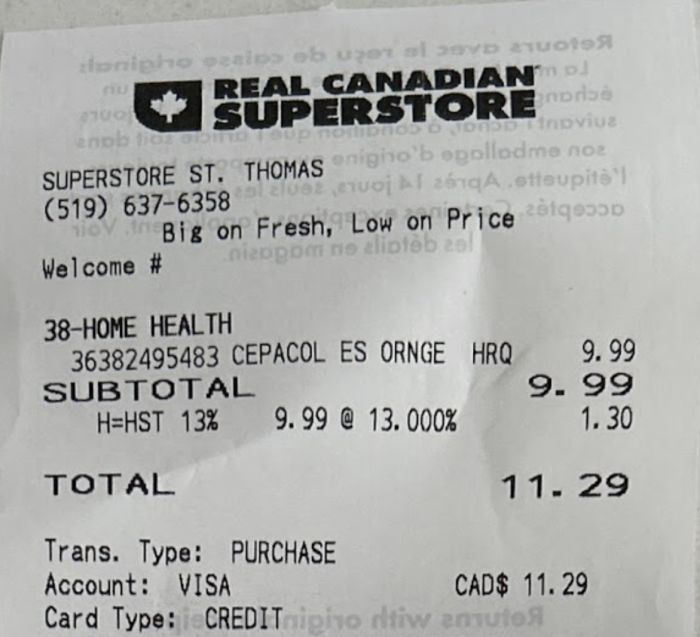
~10% of all receipts from major retailers in the US and Canada have text printed on both sides of the receipt, which often results in bleedthrough text when pictures of receipts are taken. As a human you can understand that text is mirrored and is less pronounced, so it is a text from the back of the document, so you ignore it when you read the main text. But it’s trickier for OCR systems. If you just try to extract the text – you will stumble upon a problem that bleed through text might also be extracted as a normal text. And obviously it can’t be read correctly, as it is mirrored, so you end up with gibberish in your OCR output.
Removing the bleed through text improves the accuracy of data extracted by 15% for tricky cases. That’s one example where Veryfi’s multimodal data extraction API shines.
Why traditional tricks fall short
There are number of ways one could go to deal with bleed through test, just to name a few:
- Use a weak OCR that skips text when it’s not very readable. Disadvantage – it often misses a legit text and still can read some bleed through that has high visibility.
- Filter out parts of the text based on the ocr score. Same disadvantages as above, but accuracy overall should be a little higher.
- Use an algorithm that tries to remove text that has high opacity. There are a bunch of articles on this topic, you can call it soft binarisation. It can work ok, but accuracy still is not that high. We didn’t like the results we got from our experiments
So, all previous approaches are not perfect, what did we do at Veryfi after all?
Veryfi’s Two-step vision pipeline
We divided this problem into 2 tasks:
- Find where exactly bleed through is, pixel level precision
- Use adaptive cleanup to the parts segmented as bleed through
For the first part we trained a semantic segmentation model. We used a newer and more efficient backbone, but overall – similar idea. After training the model – we optimized it to run as fast as possible on the target hardware so our API can respond in real time with minimal latency.
We paid a serious amount of attention to quality annotations for the training data. All of that allowed us to train a very accurate and still fast segmentation model. Later we will show how detailed annotation has to be, so this task is solved.
For the second part we only need to carefully remove those segmented parts for the data extraction model. We do that with our custom adaptive cleanup algorithm.
Finally, as mentioned before, if we didn’t do anything with the bleed through text – we would end up with incorrect text in line items and other important fields. Let’s see how previously described steps work.
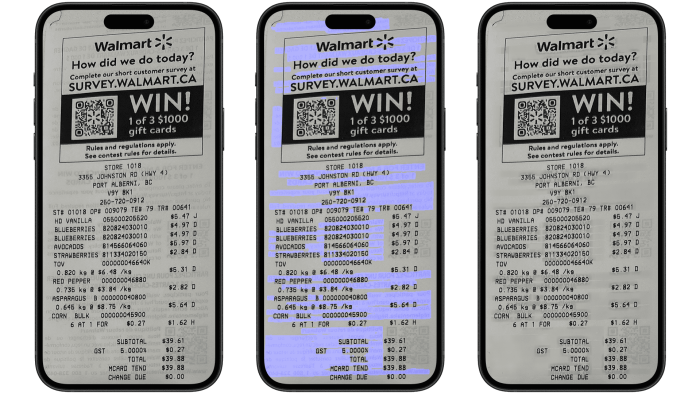
On the first screenshot is the original image. Step 1 shows bleed-through segmentation (in blue). As you can see, the blue color indicates the parts with bleed-through that our model predicted. The model does a great job not only finding all bleed-through text but also not marking legitimate text, which is crucial to avoid data loss. The last screenshot shows adaptive cleanup as step 2. As a result, legitimate text remains untouched while bleed-through text is removed, improving data extraction quality.
– Argo Saakian
Author Bio:
Argo is leading Fraud Detection suite at Veryfi, developing computer vision and machine learning models end to end.